
 BanditAI
1099 Aggregation for High-Volume Tax Reporting
Manage high-volume 1099 reporting more efficiently with TaxBandits Aggregation feature by combining eligible transactions for the same recipient into fewer tax forms and reducing repetitive form preparation.
- Review results before confirming
- Transaction-level visibility
PAYMENTS
John Smith · 2026


AGGREGATED TAX FORM

- Payment 1$1,200.00
- Payment 2$850.00
- Payment 3$2,300.00
- Payment 4$600.00
One Recipient, One Form
What Is 1099 Aggregation?
1099 aggregation combines multiple payments made to the same recipient into a single 1099 form. Instead of one form for every payment, the recipient gets one form showing the total.
Payments combine only when all four match.
Combined into one 1099-NEC
Two payments to one contractor become one 1099 for $2,500.
Who It Helps
Made for 1099 Filers With Recipients Paid Often

Digital Platforms
Platforms and marketplaces
Sellers, drivers, and creators paid through your platform get one form with their total, not one per transaction.
- 1099-K
- 1099-NEC

Repeat Payments
Businesses with recurring payments
Monthly invoices and repeat jobs for the same contractor or vendor land on one form, not a stack of them.
- 1099-NEC
- 1099-MISC

Tax Professionals
Accountants and tax professionals
Filing for many clients means fewer forms to prepare and review for each one.
- All supported forms

Financial Institutions
Banks, custodians, and plan administrators
Regular interest, dividend, and distribution payments to the same recipient are reported on one form.
- 1099-INT
- 1099-DIV
- 1099-R
- 1099-Q
Why It Matters
What You Gain With 1099 Aggregation

Stays manageable as volume grows
Your form count follows your recipients, not your transactions, so more payments don’t mean more forms.

Less to prepare and file
A year of payments to one recipient becomes one form to prepare, review, and file.

A smaller filing bill
Filing is billed per form, so fewer forms means lower filing costs.

One clear form for each recipient
Recipients see their total in one place, not several forms to add up.

Fewer chances for errors
Fewer forms means fewer chances for duplicate, missing, or mismatched entries.

You review before anything combines
TaxBandits shows the results first, and nothing is aggregated until you confirm.
The Filing Experience
How to File an Aggregated 1099 Form With TaxBandits
Aggregation is part of the filing flow, so there’s nothing separate to set up.
Review the results before you confirm — every payment stays on record in the Transaction Report.
Keep the Detail
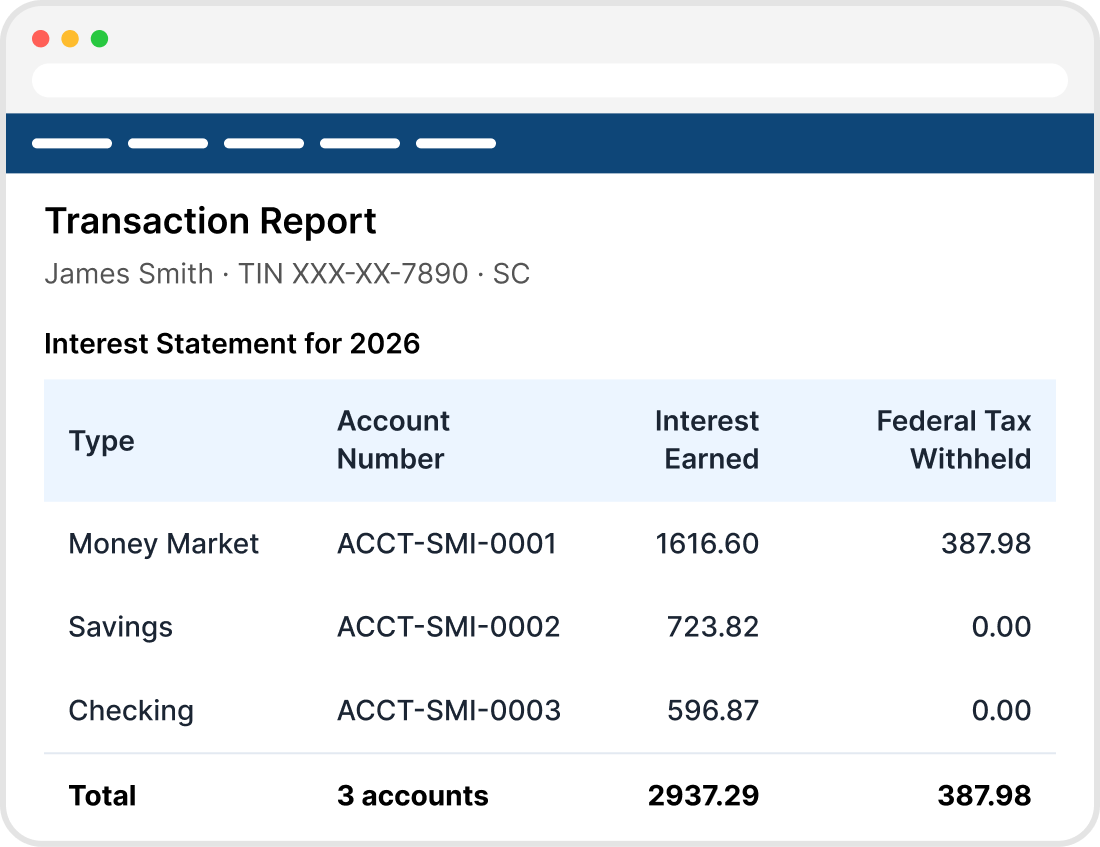
Add a Transaction Report to Your Aggregate 1099
After aggregating, attach or generate a Transaction Report to show the individual payments behind each total.
-

Optional
Add it only when a filing calls for it. Aggregation works the same
without it. -

Columns you choose
Pick which transaction details appear, so the report shows what matters to your records and your recipients.
-

Goes out with recipient copies
Recipients receive the breakdown along with their form, not only the total.
Eligible Form Types
1099 Forms You Can Aggregate
Aggregation is available for the following 1099 forms.

Form 1099-NEC
Nonemployee compensation, such as payments to contractors and freelancers.
Form 1099-MISC
Miscellaneous income, such as rents, royalties, and prizes.

Form 1099-INT
Interest income paid to a recipient.

Form 1099-DIV
Dividends and distributions.

Form 1099-R
Distributions from retirement plans, pensions, and annuities.

Form 1099-Q
Payments from qualified education programs.

Form 1099-S
Proceeds from real estate transactions.

Form 1099-K
Payment card and third-party network transactions.
The Guardrails
The Matching Rules Behind 1099 Aggregation
Payments are combined only when their key reporting details match.
| Matching detail | Can be combined |  Can’t be combined Can’t be combined |
|---|---|---|
| Recipient | Same recipient, with the same TIN | Different recipients or different TINs |
| Payer | Same payer record | Different payer records |
| Tax year | Same tax year | Different tax years |
| Form type | Same form type, such as 1099-NEC with 1099-NEC | Different form types, such as 1099-NEC with 1099-MISC |
| State details | Compatible state withholding and filing information | State withholding or filing details that don’t align |
| Form-specific details | Matching boxes, codes, indicators, account types, plan types, and transaction classifications | Differences such as distribution codes, account classifications, or retirement plan types |
Payments that don’t match are excluded from aggregation and filed on their own form, so each form stays accurate.
Frequently Asked Questions
1099 aggregation reports several payments to the same recipient on one 1099 form, so you file one form showing the recipient’s total in place of one form per payment. Payments are combined only when key reporting details match, such as the recipient’s TIN, the payer, the tax year, and the form type. Payments that don’t match are filed separately.
Payments can be aggregated when they share the same recipient and TIN, the same payer record, the same tax year, and the same form type. State withholding and filing details must be compatible, and form-specific details such as boxes, codes, and account or plan types must match. Payments that meet all of these are combined into one form.
No. Two payments to the same recipient are combined only if their reporting details also match, including payer, tax year, form type, state details, and form-specific details such as distribution codes. Payments that differ on any of these are excluded from aggregation and filed separately, so each form stays accurate.
No. Each aggregated form covers a single form type, so a 1099-NEC payment can’t be combined with a 1099-MISC payment. Payments are combined only with others reported on the same form type, in the same box or income category. Payments on different form types are each reported on their own form.
TaxBandits currently supports aggregation for Form 1099-NEC, 1099-MISC, 1099-INT, 1099-DIV, 1099-R, 1099-Q, 1099-S, and 1099-K. Eligible payments on each of these forms can be combined when they meet the matching requirements. Aggregation happens within each form type, so a recipient paid on two different forms receives one aggregated form for each.
The Transaction Report is an optional breakdown of the individual payments combined into an aggregated 1099. You can attach or generate it after aggregating, customize which columns appear, and include it with recipient copies. It lets you and your recipients trace each total back to the individual payments behind it.
It can. TaxBandits charges per form, as most filing services do, so combining eligible payments into fewer forms means fewer forms to pay for. The saving depends on your plan and on how many of your payments qualify to be combined, since payments that don’t match are still filed on their own forms.
Aggregation changes how many forms you file: it combines eligible payments for the same recipient into one form. Bulk filing changes how you prepare and submit them: it moves many forms through a single workflow. One reduces the number of forms; the other speeds up handling the forms you have. They solve different problems and don’t replace each other.
File fewer 1099s, with every payment on record
Start your filing on TaxBandits and aggregate eligible payments before you submit.
- Review results before confirming
- Transaction-level visibility


