
 BanditAI
Retirement Tax Reporting for Plan Administrators, TPAs and Account Providers
File the plan’s annual return and every participant return from one platform: Form 5500, 1099-R, 5498, and the forms around them. Bulk preparation and validation are built in.
Find the right filing setup for your plans
Share your plan, participant and form volume. We’ll recommend the right setup.
Who We Serve
Built for the People Who Report Retirement Money
For one plan or for every client you serve, the pressure is the same:
the right form, clean data, and a filing that lands on time.

Many Sponsors, One Workload
TPAs and Recordkeepers
File each client’s returns under its own EIN, from one account.


Volume Without Rework
IRA Custodians and Trustees
Report contributions and distributions in bulk, with TINs checked before anything is filed.

Less Common Forms, Same Workflow
HSA, Education and ABLE Account Providers
File 5498-SA, 5498-ESA, 5498-QA, and their 1099 counterparts without a separate tool.

Distributions That Stay Consistent
Insurers and Annuity Issuers
File 1099-Rfor annuities and insurance contracts alongside the rest of your returns.
Return Types
Every Return You File, in One Place
Plan returns, distributions, contributions and savings accounts.
Start with the family that matches your work.
Plan Returns
The Right Annual Return for Every Plan
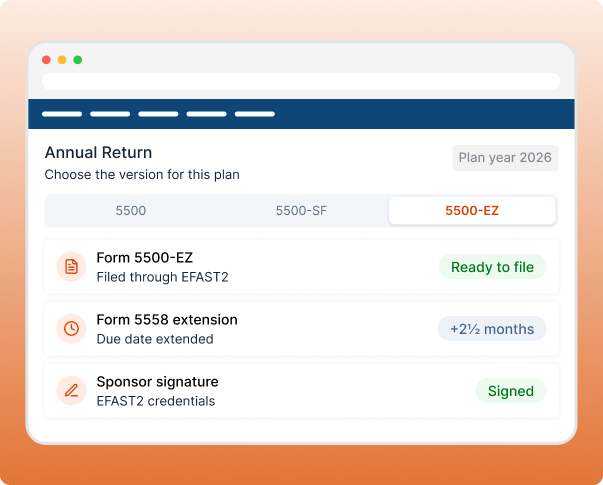
Plan returns are filed by the sponsor or administrator through EFAST2. Choose the version that matches the plan, and request more time with 5558 when you need it.
-
5500: Annual return for employee benefit plans, including 401(k) and
pension plans - 5500-SF: Short form for small plans that meet the eligibility rules
- 5500-EZ: One-participant plans and certain foreign plans
- 5558: Automatic extension of 2½ months for the 5500 series
Which form?
If the plan covers only the owner (and spouse) or partners (and their spouses), it’s a one-participant plan. File 5500-EZ, not 5500-SF.
Distributions
Every Distribution, Reported to the Participant and the IRS
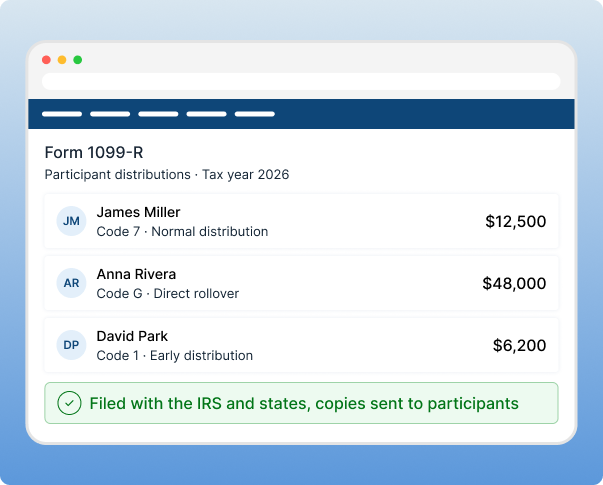
Payers file Form 1099-R for money leaving a retirement plan or IRA, including rollovers and Roth conversions. Participants use their copy on their own tax return.
- 1099-R: Distributions from pensions, annuities, IRAs, profit-sharing plans and insurance contracts. Filed by plan administrators, custodians and insurers.
Which form?
If the plan covers only the owner (and spouse) or partners (and their spouses), it’s a one-participant plan. File 5500-EZ, not 5500-SF.
Contributions
Contributions and Account Values, Reported After the Year Closes
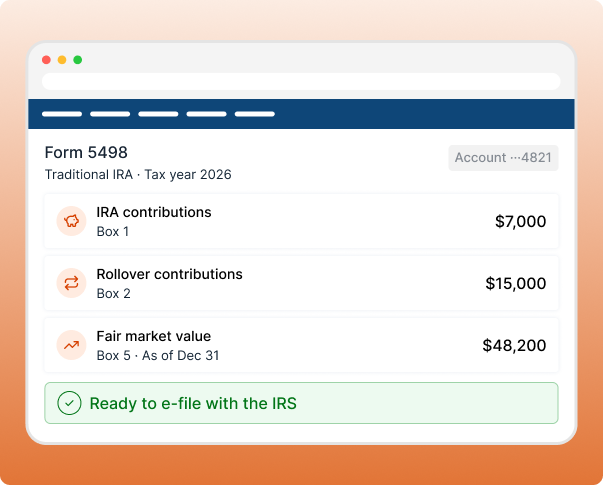
IRA trustees and issuers file Form 5498 for each account participant, showing what went in and what the account was worth.
- 5498: IRA contributions, rollovers and fair market value

Form 1096 is generated automatically when you e-file the 5498 series.
Savings Accounts
Health, Education and ABLE Accounts,
Covered Too
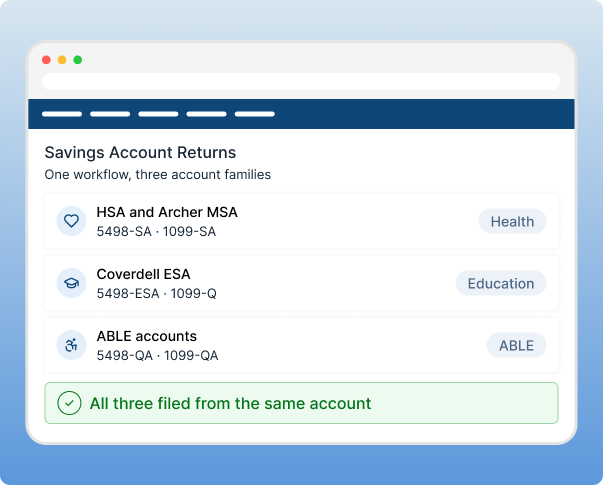
One institution often runs more than one account type. Report contributions and distributions for each from the same place.
- HSA, Archer MSA and Medicare Advantage MSA: 5498-SA for contributions, 1099-SA for distributions
- Coverdell ESA and education programs: 5498-ESA for contributions, 1099-Q for distributions
- ABLE accounts: 5498-QA for contributions, 1099-QA for distributions
A 5498-SA or 5498-ESA is needed only for accounts with contributions
that year.
The Platform
A Filing Platform Built for Plan and Participant Volume
Your filing load grows with every plan and participant you add.
These five parts of the platform are built for it.
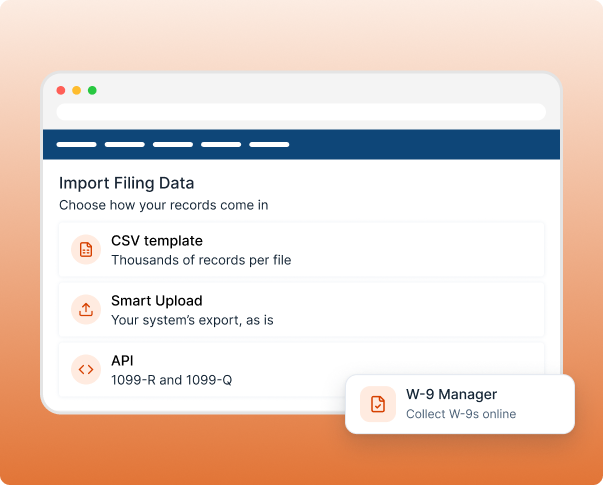
Bring Your Data In, However It’s Stored
Import from recordkeeping, custody or payroll systems as they are, with no re-keying.
- CSV template: Thousands of records in one file.
- Smart Upload: Your system’s export, no reformatting.
- API: File 1099-R and 1099-Q straight from your systems.
- W-9 Manager: Collect W-9s online and file from them.
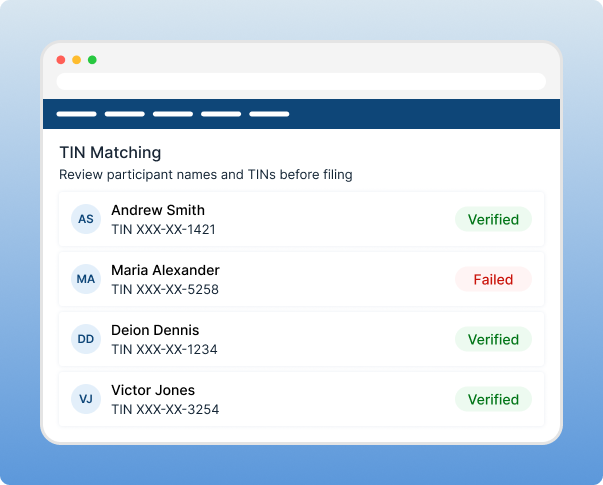
Catch Mismatches Before the IRS Does
A wrong TIN is quick to fix before filing and slow to fix after a notice.
- TIN Matching: Names and TINs verified on 1099 forms.
- IRS business rules: Errors show on screen, not in a rejection.
- Address validation: USPS checks so copies reach participants.
- Smart Review: BanditAI checks filings before you submit.
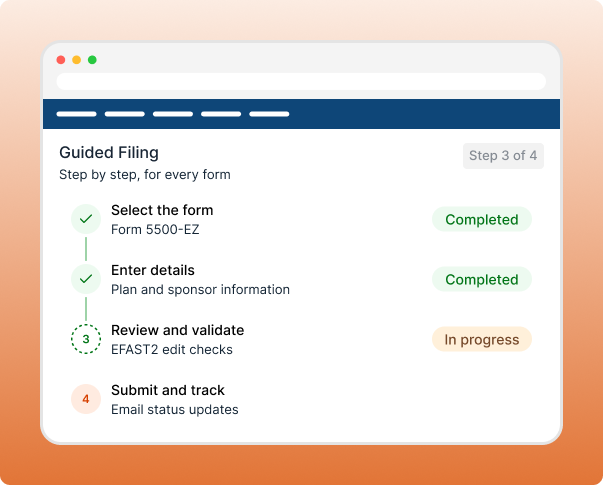
Guided From First Field to Final Submission
Every form follows a step-by-step flow, with email status updates after you submit.
- Plan return prompts: Plan codes and compliance questions on the 5500 series.
- Form 5558: Extensions in minutes, with confirmation of receipt.
- Sponsor signature: Sponsors sign with EFAST2 credentials, or TPAs request them by secure link.
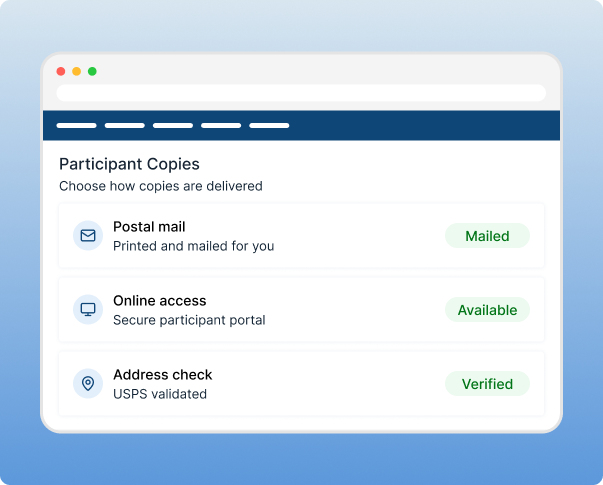
Participant Copies, Delivered for You
Skip mailing thousands of 1099-R and 5498 copies by hand.
- Postal mailing: Printed and mailed on your behalf.
- Online access: Participants view copies in a secure portal.
- Mail tracking: Get notified when copies are sent (API).
Help After You File
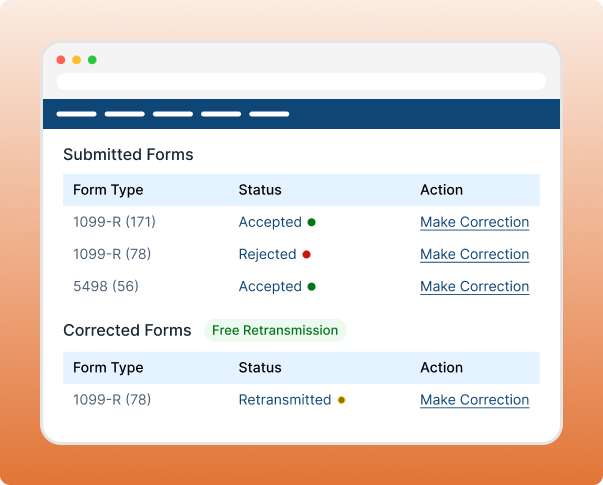
A rejection or a corrected TIN shouldn’t mean a second bill.
- Free retransmission if a return is rejected
- Free corrections to returns you have already filed
- Amended 5500-EZ filings at no extra cost
- Custom pricing for high-volume filers, through our team
Plans and Sponsors
One Account for Every Plan and Sponsor
Manage plans, payers, clients and teams in one controlled workspace.

Multi-Entity Filing
File Across All Plan Entities
Administrators, trustees and TPAs file under separate EINs, and each client’s returns stay separate.

Bulk Filing
Built for real filing volume
Prepare 5500, 1099-R and 5498 batches in one pass, not form by form.

Sponsor Sign-Off
Manage Department Access
Send a secure link so plan sponsors review and sign their own returns, or request their EFAST2 credentials the same way.

Team Management
Maintain Control Across
Every Team
Give plan administration, distributions and compliance their own role-based access.
Security
Security Built Around the Data You Hold
Participant filings carry SSNs, account details and balances.
TaxBandits protects that data from upload to filing.

SOC 2 Type II
Independent audits of security, availability, processing integrity, confidentiality and privacy controls.

Encryption
Data is encrypted in transit and at rest, including SSNs, EINs and account details.

Multi-Factor Authentication
Add a second sign-in step with an authenticator app or SMS code.
Role-Based Access
Each team sees only the plans and returns it handles.

Audit Trails
Activity logs show who did what, for internal and client review.
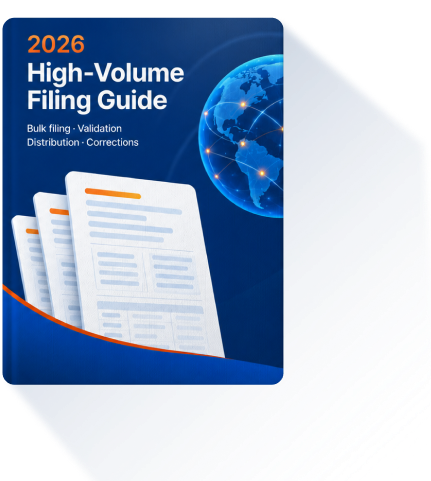
Resource Guide
A Practical Guide to High-Volume Filing
How to prepare large datasets, validate TINs, deliver copies and handle corrections when you file thousands of returns, not dozens.
- Preparing large datasets
- Validation and review
- Recipient distribution
- Corrections and filing visibility
Connect With the Systems You Already Use
Bring plan and participant data in from the tools your team already runs.
FAQ
Tax Reporting for Retirement Providers, Answered
TaxBandits supports the 5500 series (Form 5500, 5500-SF and 5500-EZ) with Form 5558 for extensions, Form 1099-R for distributions, and the 5498 series (5498, 5498-SA, 5498-ESA and 5498-QA) for contributions. It also supports 1099-SA, 1099-Q and 1099-QA for health, education and ABLE account distributions. Plan returns and participant returns can be filed from one account.
Learn more: E-file Form 5500, E-file Form 1099-R, E-file Form 5498.
Form 5500 is the full annual return for employee benefit plans. Form 5500-SF is the short version for small plans that meet its eligibility rules. Form 5500-EZ is for one-participant plans, meaning owners, partners and their spouses, and for certain foreign plans. Since 2021, a one-participant plan cannot use 5500-SF and must file 5500-EZ.
Learn more: E-file Form 5500, E-file Form 1099-R, E-file Form 5500-EZ.
Payers that distribute retirement money file it, including plan administrators, IRA custodians and insurers. It reports distributions from pensions, annuities, IRAs, profit-sharing plans and insurance contracts, including rollovers and Roth conversions. Each participant receives a copy to use on their own tax return. The IRS sets reporting thresholds, so confirm current requirements each filing season.
IRA trustees and issuers file Form 5498 for each account participant. It reports IRA contributions, rollovers and the account’s fair market value. The 5498 series also covers HSAs and MSAs (5498-SA), Coverdell ESAs (5498-ESA) and ABLE accounts (5498-QA). Deadlines differ from 1099-R, so check current due dates each year.
Yes. Use the CSV template, Smart Upload or the API to prepare and validate thousands of returns in one batch workflow, and fix errors before anything is transmitted. 1099 returns include federal and state filing, and participant copies can be mailed or made available online. Plan returns and participant returns file from the same account.
Returns are checked against IRS business rules before filing, and TIN Matching verifies participant names and TINs on 1099 forms so mismatches are flagged early. Plan returns include guided prompts for plan characteristic codes and compliance questions. If a return is still rejected, retransmission costs nothing extra, and you get status updates by email.
Yes for 1099 forms, including 1099-R: TaxBandits files with the IRS and applicable states from one workflow. The 5500 series is filed electronically through EFAST2 instead, and the 5498 series is filed with the IRS. Where a state does not accept electronic filing, you can download the completed form and file it yourself.
Yes. Form 5558 gives an automatic 2½-month extension for Form 5500, 5500-SF and 5500-EZ, with no explanation required. Enter the plan name and number, choose the form to extend, and submit. TaxBandits transmits the request electronically through EFAST2 and confirms receipt, so nothing needs to be printed or mailed.
Learn more: E-file Form 5558.
The plan sponsor or administrator signs with their own EFAST2 credentials. If you file on a client’s behalf, you can request those credentials through a secure link, or upload a wet-signed copy of the form. Signature requirements for other 5500-series forms follow the IRS and Department of Labor instructions.
Yes. TaxBandits supports multiple EINs in one account, so TPAs, trustees and administrators can manage every plan sponsor and client from one account. Role-based access keeps each team in its own data, each client’s returns stay separate, and secure links let plan sponsors review and sign their own returns.
Yes for 1099-R and 1099-Q. The API lets you create, validate, file and track returns directly from your systems, with postal mailing of recipient copies available. You can also collect W-9 forms and validate TINs through the same integration, without re-keying data.
Learn more: TaxBandits API documentation.
TaxBandits is SOC 2 Type II certified and encrypts data in transit and at rest, including SSNs and account details. You can add multi-factor authentication to every account, use role-based access so each team sees only its own plans and returns, and review activity logs for internal audit.
Learn more: TaxBandits security practices
From the TaxBandits Family
Setting Up Retirement Plans for the Clients
You Serve?
WealthRabbit is our digital retirement platform for small businesses, the self-employed and accounting professionals. Set up SIMPLE IRA, SEP IRA, Traditional IRA and Roth IRA plans online, with payroll integration and a CPA partner program.
For Small Businesses
SIMPLE IRA
For teams up to 100 employees. No filings, no testing, no HR.
For Self-Employed
SEP IRA
Up to $72,000 in 2026. Fully tax-deductible.
For Individuals
Traditional IRA
Deduct today. Grow tax-deferred. Pay taxes later.
For Individuals
Roth IRA
Pay taxes once. Tax-free forever.
Bring Every Retirement Return Into One Platform
File Form 5500, 1099-R, 5498 and the forms around them for every plan, sponsor and participant you serve.

