
 BanditAI
Line by Line IRS Form 5498-SA Instructions
Form 5498-SA is used to report contributions made to HSAs, Archer MSAs, and MA MSAs. If you're a custodian or trustee of these accounts, you're required to file this form with the IRS. This guide provides clear instructions to help you complete and file Form 5498-SA accurately.
Table of contents:
What is Form 5498-SA?
IRS Form 5498-SA is an informational tax form used to report contributions made to a Health Savings Account (HSA), Archer Medical Savings Account (Archer MSA), or Medicare Advantage MSA (MA MSA) for a given tax year. If you’re a trustee or custodian (such as a bank or financial institution) managing one of these accounts, you must file Form 5498-SA with the IRS.
What information is reported on Form 5498-SA?
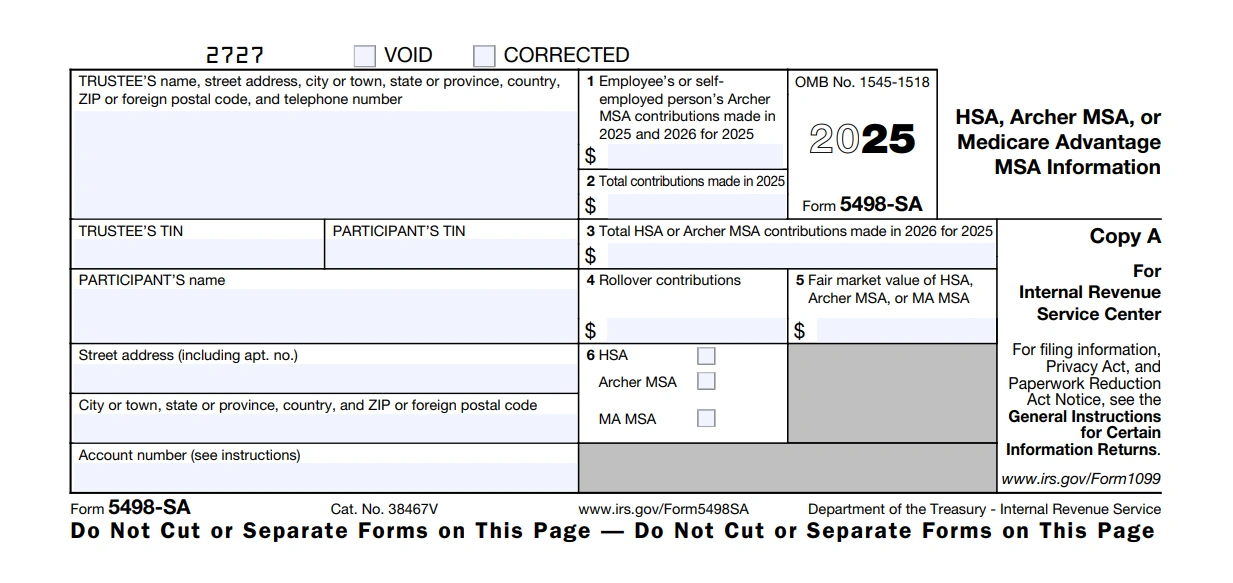
Form 5498-SA contains six important boxes. Let's explore the breakdown of each box:
Trustee Information
This section requires details about the financial institution responsible for administering the account. Be sure to include:
- Name of the trustee
- Street address, city or town, state or province, and ZIP or foreign postal code
- Country
- Telephone number
- Trustee’s Taxpayer Identification Number (TIN)
Participant Information
This section identifies the account holder (participant) by providing the following information:
- Full name of the participant
- Street address, including apartment or suite number if applicable
- City or town, state or province, and ZIP or foreign postal code
- Country
- 9-digit Taxpayer Identification Number (TIN)
- Account number associated with the HSA, Archer MSA, or MA MSA
-
Box 1: Employee or Self-Employed Person's Archer MSA Contributions Made in 2025 and 2026 for 2025
This box reports Archer MSA contributions made for the 2025 tax year.
- Include contributions made by an employee or self-employed individual during 2025 and up to April 15, 2026.
- Only report Archer MSA contributions—do not include HSA contributions.
- Report the total gross amount, including any excess contributions (even if withdrawn later).
-
Box 2: Total Contributions Made in 2025
Report the total contributions made to an HSA or Archer MSA in 2025. This includes:
- Any contributions made in 2025 for 2024.
- Qualified HSA funding distributions are trustee-to-trustee transfers from an IRA to an HSA, as allowed under section 408(d)(9). This section allows individuals to make a one-time, tax-free transfer from their Individual Retirement Account (IRA) directly into a Health Savings Account (HSA).
However, do not report the following as contributions in Form 5498-SA:
-
Any excess employer contributions and earnings the employer withdrew based on
IRS Notice 2008-59. According to this notice, if an employer mistakenly contributes more than the maximum annual contribution, they can request the return of the excess and its earnings from the HSA custodian. These returned amounts should not be reported as contributions on Form 5498-SA. - Any rollover contributions should instead be reported in Box 4.
You may choose to report MA MSA contributions made in 2025 by the Secretary of Health and Human Services or their representative, but it’s not required.
-
Box 3: Total HSA or Archer MSA Contributions Made in 2026 for 2025
Report the total contributions made to a Health Savings Account (HSA) or Archer Medical Savings Account (MSA) in 2026, designated for the 2025 tax year.
-
Box 4: Rollover Contributions
Enter the rollover amount contributed to an HSA or Archer MSA during 2025. These amounts should not be included in box 2 (Total Contributions Made in 2025).
-
Box 5: Fair Market Value of HSA, Archer MSA, or MA MSA
Enter the fair market value (FMV) of the account as of December 31, 2025.
-
Box 6: Checkbox (Account Type)
Check the required box to indicate whether the account is an HSA, Archer MSA, or MA MSA. Remember, if the participant has more than one type of account, you must file a separate form for each.
When is the deadline to file Form 5498-SA?
The deadline for filing Form 5498-SA with the IRS and distributing the form copy to the participant is June 02, 2026.
How to File Form 5498-SA Electronically?
TaxBandits, an IRS-authorized e-file service provider, offers a comprehensive solution to prepare and e-file Form 5498-SA accurately. By following the simple steps outlined below, you can easily file Form 5498-SA with the IRS:
- Step 1: Create an account in TaxBandits.
- Step 2: Choose "Form 5498-SA" and the Tax Year.
- Step 3: Enter Form 5498-SA Information.
- Step 4: Review and Transmit to the IRS.
- Step 5: Distribute Participant Copies through Postal Mailing and Online Access.
Related Topic
Form 5498 Resources

FAQs

Blog

Help Videos