
 BanditAI
What is Form 1099 K?
Form 1099-K reports payment transactions processed through payment cards and third-party networks. It is used to report the IRS of gross payments received by businesses or individuals.
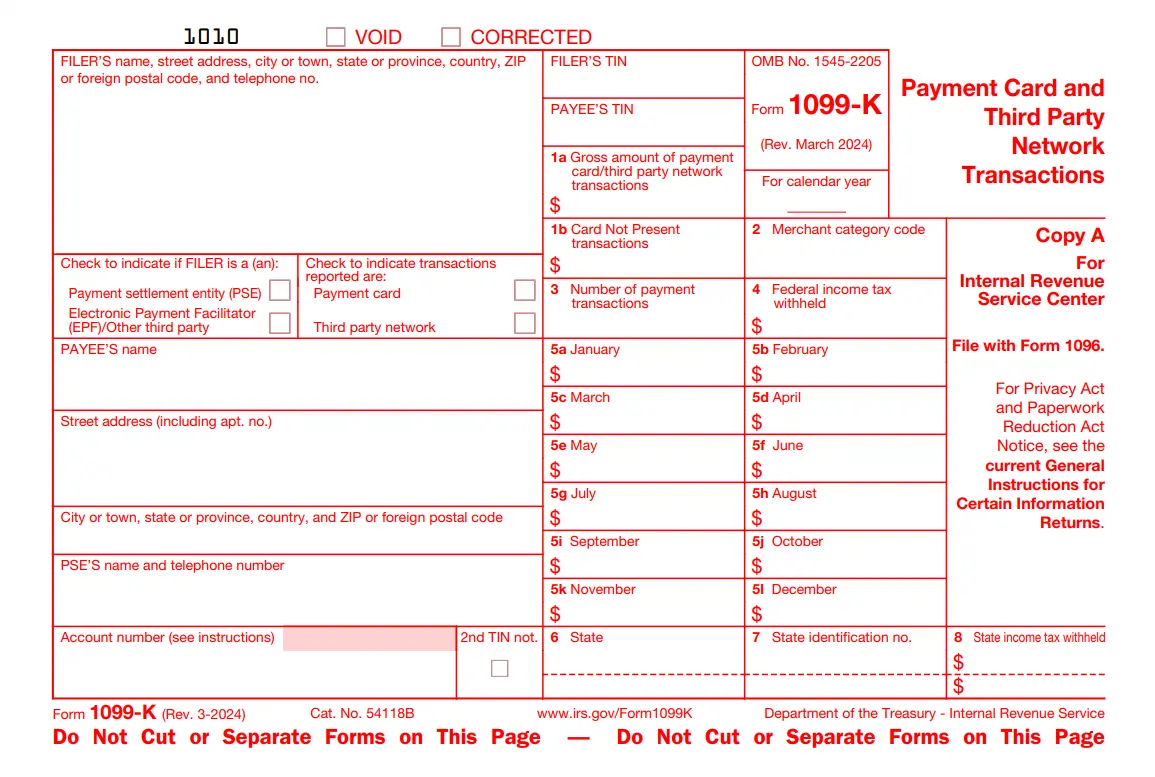
Form 1099 K - Payment Card & Third-Party Network Transactions
Updated on November 20, 2025 - 03.15 PM by Admin, TaxBandits
Form 1099-K is filed by payment settlement entities to report payments processed through payment cards or third-party networks during the year. This form helps ensure accurate reporting of payments made to merchants, contractors, and service providers.
Originally, the IRS planned to lower the Form 1099-K reporting threshold to $2,500 for 2025 and $600 for 2026, with no minimum number of transactions. However, these changes have been rolled back. Following the passage of the One Big Beautiful Bill, the threshold for 2025 tax year is $20,000 in payments and more than 200 transactions.
In this article, we cover the following topics:
- What is Form 1099 K?
- What are the Changes to Form 1099-K for the 2025 Tax Year?
- Who Needs to File Form 1099-K?
- What Is a Payment Settlement Entity?
- What are the information required to e-file Form 1099-K?
- When is the Deadline to File Tax Form 1099 K?
- How to Automate 1099-K and Other Tax Forms with TaxBandits API?
- How to File Form 1099 K Electronically with TaxBandits?
1. What is Form 1099 K?
Form 1099-K is an IRS information return used to report online payment transactions made during the year. These transactions include income received from payment cards (debit, credit, and stored value cards) and third-party network transactions (payment apps and online marketplaces).
2. What are the Changes to Form 1099-K for the 2025 Tax Year?
The IRS has announced significant updates to Form 1099-K reporting rules for the 2025 tax year. Following recent legislative changes, the reporting threshold has been restored to its previous levels, reversing the lower limits that were set to take effect under the American Rescue Plan Act. These updates aim to simplify reporting requirements for individuals and small businesses that use third-party payment networks for transactions.
- Threshold Reverted: The reporting threshold has reverted to more than $20,000 in total payments and over 200 transactions through third-party network transactions.
- Repeal of $600 Threshold: The $600 reporting threshold introduced under the American Rescue Plan Act has been repealed.
- New Legislation: The change was made under the ‘One Big Beautiful Bill Act’, which became law on July 4, 2025
- Phased Plan Cancelled: The IRS’s previous plan to lower the threshold to $2,500 for 2025 and then to $600 in future years has been abandoned.
- Reduced Reporting Burden: With the higher threshold restored, fewer individuals and small businesses will receive Form 1099-K, reducing unnecessary paperwork and confusion for casual sellers.
3. Who Needs to File Form 1099-K?
Form 1099-K must be filed by the Payment Settlement Entity (PSE) for payment made under the following condition.
- If any payment is made through a payment card transaction, such as Credit cards, Debit cards, or
stored value cards. -
If payment is made through payment apps or an online marketplace of at least $20,000 with 200 transactions. This payment may include selling personal items or goods, renting property, or providing services through the following platforms.
- Digital wallets or peer-to-peer payment platforms such as PayPal, Venmo, and Cash App.
- Online marketplaces (Sales or resale of goods such as clothing, cars, furniture, and more).
- Auction sites.
- Car rental or taxi services.
- Craft or maker marketplace.
- Real estate marketplace.
- Ticket exchange or resale site.
- Crowdfunding platform.
- Freelance marketplace.
4. What Is a Payment Settlement Entity?
A Payment Settlement Entity (PSE) is one that facilitates the payment made through card transactions (credit cards, debit cards, or other payment cards) or third-party network transactions (PayPal, Venmo, Amazon, Esty, etc.) on behalf of merchants.
There are two types of PSE.
- Merchant Acquiring Entity: An organization that has a contractual obligation to make payment to participating payees in the settlement of payment card transactions.
- Third-Party Settlement Organisation: An organization that has the contractual obligation to make payment to participating payees of third-party network transactions.
5. What are the information required to e-file Form 1099-K?
To file Form 1099-K, ensure you have the following information handy. We have listed the information required to complete your Form 1099-K.
Filer’s information: Name, Address, TIN, Check the Type of Filer (PSE or EPF), Mode of transaction.
Payee’s Information: Name, Address, TIN.
- Gross amount of payment report via Payment cards or third-party networks
- Merchant Category Code
- Card not present transaction
- Number of payment transactions
- Federal income tax withheld
- Gross payment transactions for each month
- State Information
E-file now with TaxBandits and securely file your Form 1099-K to the IRS!
6. When is the Deadline to File Tax Form 1099 K?
Like other 1099 forms, the 1099-K follows the same deadline. Here is the deadline to file Form 1099-K for the 2025 tax year.
| Filing Type | Due Date |
|---|---|
| Sending Recipient Copy | February 2, 2026 |
| By IRS e-filing method | March 31, 2026 |
| By IRS paper filing method | March 2, 2026 |
E-File Form 1099-K before the deadline to avoid last-minute rush & Late filing Penalties.
7. How to Automate 1099-K and Other Tax Forms with TaxBandits API?
TaxBandits offers a powerful API integration for software providers and bulk filers to streamline the e-filing and distribution process for 1099-K, along with other forms like 1099-NEC, 1099-MISC, and more. Learn how TaxBandits API simplifies your filing needs with 1099 Automation!
8. How to File Form 1099 K Electronically with TaxBandits?
With TaxBandits, you can e-file Form 1099-K in minutes. Just follow the few simple steps below.
- Step 1: Enter the Form 1099-K Details
- Step 2: Review the Form 1099-K Details
- Step 3: Transmit the Form to the IRS and State
- Step 4: Distribute Recipient Copy (Postal or Online Access)
Your Form 1099-K will be transmitted to the IRS, and you will get instant notification once it gets accepted or rejected
by the IRS.
Frequently Asked Questions on Form 1099-K
What should you do if any personal transactions are reported on your Form 1099-K?
Any personal transactions, such as payments made to your friends or family as gifts or reimbursements, are not taxable and are not reported on Form 1099-K. However, there are chances that you might end up getting Form 1099-K from PSE for the personal transactions.
In such cases, you are required to contact the Filer (i.e., PSE) immediately and request a correct Form 1099-K. Keep a copy of the original form and all correspondence with the issuer for your records
You can avoid this personal transaction error by maintaining separate accounts for managing personal and business transactions. Thus, payment settlement entities can differentiate between business-related and non-business-related payments.
What should you do if you don’t receive the corrected 1099-K?
In case you haven’t received the corrected 1099-K from the filer, report as follows
On your Schedule 1 (Form 1040):
- Enter the error on Part I – Line 8z – Other income: "Form 1099-K received in error, (reporting amount)"
- Adjust it on Part II – Line 24z – Other adjustments: "Form 1099-K received in error, (reporting amount)"
What should you do if you receive Form 1099-K and 1099-NEC or MISC for the same payment?
Generally, you won’t receive both the Form 1099-K and 1099-MISC or NEC. However, If you have received both forms, follow the steps below
- Report any one of the payments on your tax return, either 1099-K or 1099-MISC/NEC.
- Keep the original copy of the tax return and be prepared to provide those records in case of a dispute.
However, you can avoid this confusion by following these measure
- Step up separate personal and business accounts, and make sure to pay your personal expenses through your personal account and business expenses with a business account.
- Keep track of your payments and properly label your third-party network payments on your accounting software.
- Consider revising your business payment policy to accept only online transactions such as card payments or payment apps or only through cash or check.
- Clearly state your clients not to provide Form 1099-MISC or 1099-NEC, if they have paid you through payment cards or apps.
What should I do if I receive a Form 1099-K for selling a personal item, and how do I report it on my tax return?
If you received a Form 1099-K for selling a personal item, how you report it on your tax return depends on whether you sold the item at a loss or a gain.
Personal Items Sold For Loss
Personal items that are sold for loss are not taxable. However, you should report this on your tax return.
For example, if you received a Form 1099-K for selling your guitar online for $900, the original price is $1200, which is less than you paid. Here, in this scenario, you have a loss of $300.
In such case, you have two options to report the loss:
Option 1: Report on Schedule 1 (Form 1040):
You can report and offset the Form 1099-K gross payment amount on Schedule 1 (Form 1040). Follow these steps on Schedule 1:
- Enter the Form 1099-K gross payment amount (Box 1a) on Part I – Line 8z as "Form 1099-K Personal Item Sold at a Loss, $900."
- Offset the Form 1099-K gross payment amount (Box 1a) on Part II – Line 24z as "Form 1099-K Personal Item Sold at a Loss, $900."
Option 2: Report on Form 8949:
Alternatively, you can report the loss on Form 8949, Sales and Other Dispositions of Capital Assets, which carries over to Schedule D, Capital Gains and Losses.
Personal Items Sold For Gain
If you sold a personal item at a gain and received a Form 1099-K for it, you should report the gain on both Form 8949 and Schedule D (Form 1040), as a gain on the sale of a personal item is taxable.
What should you do if the gross payment amount on Form 1099-K does not belong to you or appears to be inaccurate?
This can happen due to the following errors:
- Reporting business income on Form 1120, 1120S, or 1065, while Form 1099-K is under your name and Social Security Number.
- Sharing a credit card terminal with another party.
- The business being bought or sold during the tax year.
- Changing your business entity structure within the year.
Here's what you should do:
In all the above cases, you are required to contact the payment settlement entity (PSE) responsible for issuing the form and request a correct Form 1099-K. Additionally, be sure to maintain a detailed record of the payments.
Is the 1099-K threshold applicable to payment card transactions?
No, the 1099-K threshold does not apply to payment card transactions. All credit and debit card payments must be reported regardless of the amount or number of transactions.
The $20,000 and 200 transactions threshold applies only to third-party network transactions, such as payments made through apps like PayPal, Venmo, and Cash App or online marketplaces like Amazon, Uber, and Fiverr.
What are payments that are exempt from reporting Form 1099-K?
Generally, personal transactions, such as payments made to friends and family as gifts, reimbursements, etc, are considered non-taxable income and do not need to be reported to the IRS.
For instance, if you lend a friend some money and they pay you back, this is not considered taxable income and does not need to be reported on Form 1099-K. However, it's worth noting that there's a possibility of receiving Form 1099-K for personal transactions, as payment settlement entities may find it challenging to distinguish between personal and business transactions. To avoid any misreporting, it is advisable to maintain separate accounts for personal and business transactions, ensuring a clear distinction between the two.
What is the merchant category code in Form 1099-K?
The merchant category code in Form 1099-K is a four-digit identifier utilized by the payment card industry to classify businesses based on the goods or services they provide. This code aids in the classification of transactions and ensures accurate reporting for various types of businesses.
Do cashback and discount amounts count as taxable income?
Cashback and discount amounts are not considered taxable income and, therefore, do not need to be reported on Form 1099-K.
Helpful Resource for Form 1099-K



Success Starts with TaxBandits
An IRS Authorized Efile Provider You Can Trust!