 BanditAI
Line by Line Form 1099-INT Instructions for 2026 Tax Year
The Form 1099 Series is an extensive one, with many different forms used to report a wide variety of different payments to the IRS. The Form 1099-INT has its own specific requirements for being completed and filed with the IRS. Here are the instructions on how to fill out 1099-INT for the 2026 tax year.
Table of Contents:
What is the purpose of the Form 1099-INT?
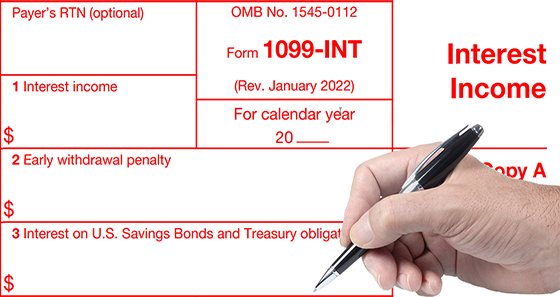
The IRS 1099-INT is used to report interest payments of $10 or more that are reported in Box 1 (Interest Income), Box 3 (Interest on US Savings Bonds and Treasury Obligations), and Box 8 (Tax-Exempt Interest). For certain interest paid in the course of a trade or business, the reporting threshold is $2,000 for payments made in 2026, up from $600, under the One Big Beautiful Bill Act.
You should also file this form if you withheld and paid any foreign tax on interest or if you withheld federal income tax payments in regards to backup withholding rules and didn’t refund these payments.
The complete Form 1099-INT instructions for 2026
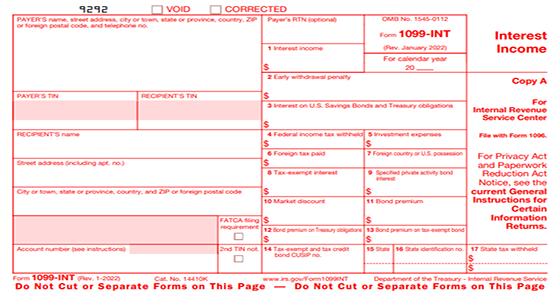
The Form 1099-INT consists of 17 data fields or “boxes”. Here is a breakdown of what is required on this form:
Before completing Form 1099-INT, you must initially enter some basic information, this includes your address, TIN, and name. You will need this same information for the recipient as well as their account number. If there is a FATCA filing requirement (Foreign Account Tax Compliance Act), you can indicate so by checking the box.
Let’s have a closer look at Form 1099-INT instructions:
- In Box 1, you should enter the interest income. Enter interest of $10 or more. This is taxable interest that does not qualify for Box 3, you shouldn’t include any interest income on U.S savings bonds or other treasury obligations.
- In Box 2, you must enter any penalty amount for early withdrawal. Don’t include this amount in Box 1 by subtracting it, this should be reported separately in Box 2.
- In Box 3, you must enter any interest income that specifically came from U.S savings bonds or treasury obligations.
- In Box 4, enter any amount of backup withholding. For example, if you don’t have this recipients’ TIN, they are subject to backup withholding on the amount entered in Box 1.
- In Box 5 is for investment expenses. This only applies to single class REMICs (Real Estate Mortgage Investment Conduit).
- Box 6 is for any foreign tax that was paid on the interest.If there is an amount of foreign tax entered in Box 6, then Box 7 must indicate the foreign country or U.S possession where this tax was paid.
- Box 8 is used to report Tax-Exempt Interest. Enter tax-exempt interest of $10 or more that is not OID, such as interest on state and municipal bonds. Tax-exempt OID is reported on Form 1099-OID, and exempt-interest dividends from a mutual fund are reported on Form 1099-DIV.
- Box 9 shows the portion of the Box 8 tax-exempt interest that comes from specified private activity bonds.
- Box 10 is used to report a market discount. For example, if the taxpayer notified you that they made a section 1278(b) election.
- Box 11 should report the bond premium that was allocated to the interest paid during the tax year.
- Box 12 refers specifically to the bond premium on U.S Treasury Obligations. According to IRS instructions, if you entered a net amount of interest in Box 3, Box 12 can be left blank.
- Box 13 refers to the bond premium on tax-exempt bonds.
- In Box 14 enter the CUSIP number of the tax-exempt bond if applicable.
- In Box 15 - 17 enter the required information if your state participates in the Combined Federal/State Filing Program or has state filing requirements.
What Are The Form 1099-INT Copies?
There are five copies of the 1099-INT Form Form that both payers and recipients should be aware of:
- Copy A: This is the red copy that is submitted to the IRS
- Copy 1: This is submitted to the State Tax Department
- Copy B: This copy is for the recipient
- Copy 2:This copy is filed by the recipient with their state income tax return
- Copy C:This copy is kept by the payer for their records
How to E-file 1099-INT Forms with TaxBandits?
Once you have all the necessary information at your fingertips, e-filing 1099-INT with Taxbandits is simple and straightforward.
- Step 1: Create an account with TaxBandits.
- Step 2: Select Form 1099-INT from your dashboard.
- Step 3: Enter the required Form 1099-INT details.
- Step 4: Review and submit Form 1099-INT to the IRS.
Additionally, our distribution services allow you to furnish recipient copies via postal mail or online on your behalf. We offer the industry's best pricing, starting at just $0.80 per form.