
 BanditAI
IRS Form 944 Instructions
If you are an employer with a tax liability of $1,000 or less, you are required to complete and file Form 944. It is important to follow step-by-step instructions for filling out Form 944 to avoid significant errors and penalties.
If you have received a notice from the IRS instructing you to file Form 944 instead of Form 941, you should report information such as Social Security, Medicare, and federal income taxes withheld.
Firstly, complete your basic business information, such as your Employer Identification Number (EIN), name, trade name, and address.
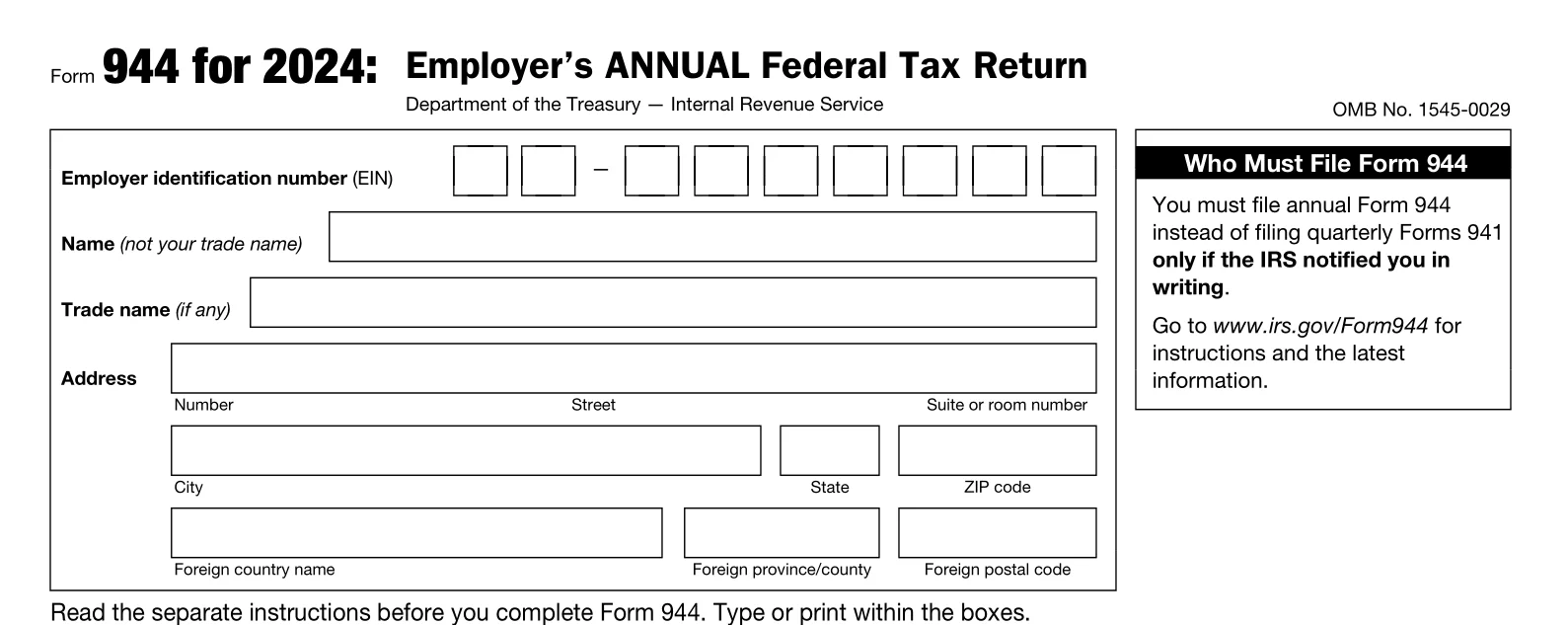
Part 1 - Answer the questions for the year
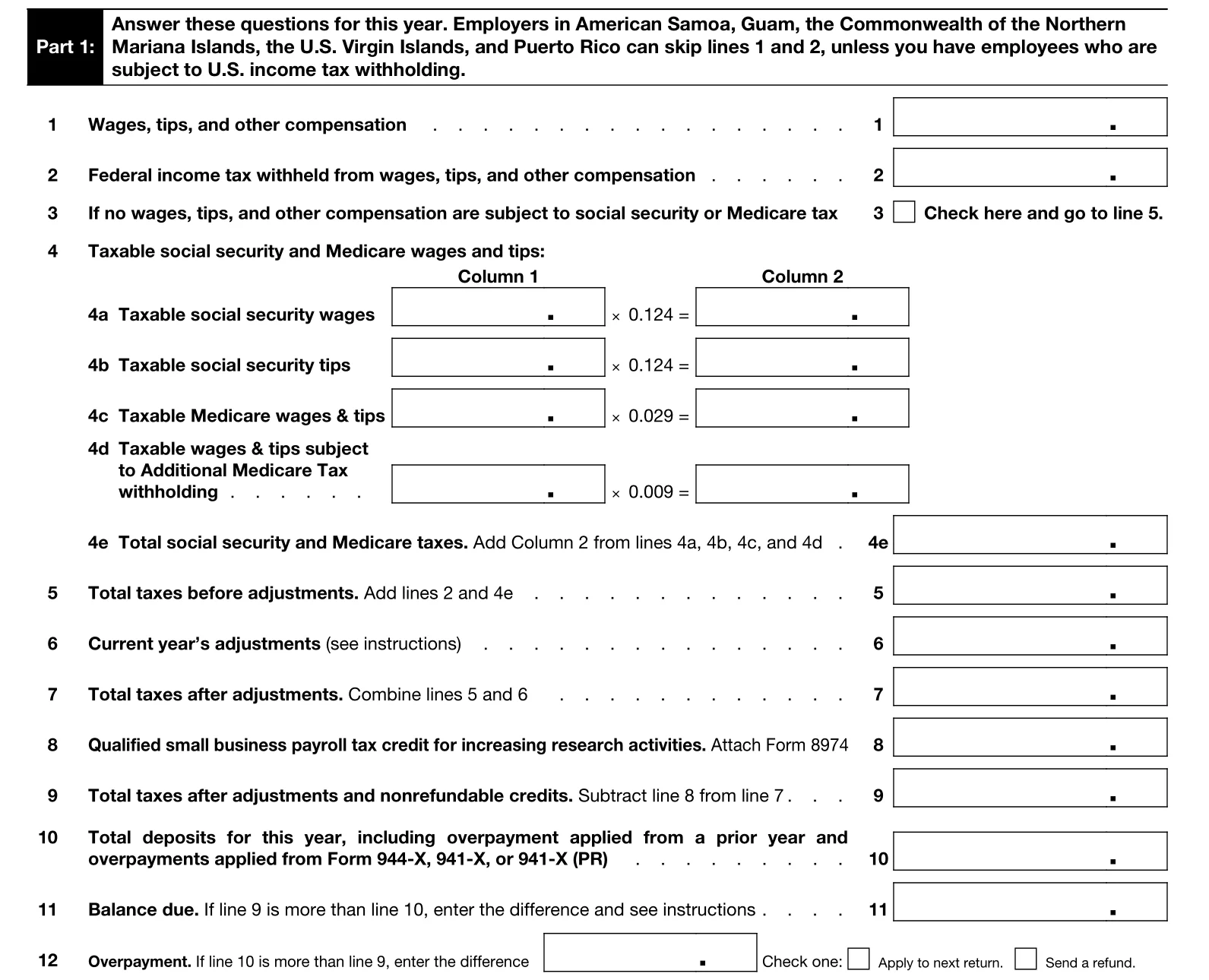
In Part 1 of IRS Form 944, you are required to enter information such as federal income tax, Social Security, and Medicare tax withheld from your employees for the tax year for which you are filing your 944.
-
Line 1
Report the total wages, tips, and other compensation paid to your employees.
-
Line 2
Enter the total of all federal income tax withheld from your employee wages, tips, and other compensation for the calendar year.
-
Line 3
Check the box, if the wages paid are not subject to Social Security or Medicare Tax withholding, and go to line 5.
-
Line 4
Lines 4a to 4e are used to report taxable Social Security and Medicare wages and tips. Calculate them by multiplying each of the boxes in column 1 with the tax rates specified and enter in column 2. Enter the total Social Security and Medicare taxes in Line 4e.
-
Line 5
Enter the total taxes before adjustment by adding lines 2 and 4e.
-
Line 6
Enter tax amounts that result from current period adjustments. These adjustments can include fractions of cents as a result of rounding, sick pay adjustments, tips, and group-term life insurance premiums you withheld on behalf of employees.
-
Line 7
Enter the total taxes after adjustment by adding lines 5 and 6.
-
Line 8
Attach Form 8974 if your business can claim any tax credit for performing or participating in research. Check the IRS for information about Form 8974 and your eligibility for the credit.
-
Line 9
Enter the difference between line 8 from line 7 to obtain the total tax due for the year.
-
Line 10
Enter the deposits including any overpayment applied prior year and overpayments applied from filing Form 944-X, 941-X, or 941-X (PR) in the current year.
-
Line 11
Enter the balance due in line 11, if line 9 is more than line 10.
-
Line 12a - Overpayment Amount
Use line 12a to report an overpayment for the year.
- If the amount on line 10 is more than the amount on line 9, enter the excess amount on line 12a.
- This amount represents the extra tax you paid.

Do not enter amounts on both line 11 and line 12a. Only one of these lines should be completed.
-
Line 12b - How You Want the Overpayment Handled
Use line 12b to tell the IRS what to do with your overpayment.
- Apply to next return – The overpayment will be credited toward your next tax return, or
- Refund – The IRS will send the overpayment back to you.
Direct Deposit (Optional)
Choosing direct deposit allows you to receive your refund faster and more securely than a paper check.
To receive your refund by direct deposit, you must complete lines 12c–12e.
-
Line 12c - Routing Number
Enter your bank’s 9-digit routing number.
- The first two digits must be 01–12 or 21–32.
- Confirm that your financial institution accepts direct deposits.
-
Contact your bank if:
- The routing number on your deposit slip is different from the one on your checks.
- You’re depositing into a savings account that doesn’t allow checks, or
- Your checks are payable through a different bank than where your account is held.
-
Line 12d - Type of Account
Select the type of bank account for the refund:
- Checking, or
- Savings
Choose only one option. Selecting the wrong account type may cause the deposit to be rejected.
-
Line 12e - Account Number
Enter your bank account number for the direct deposit.
- Up to 17 characters (numbers and letters).
- Include hyphens, but do not include spaces or special symbols.
- Enter the number from left to right, leaving unused boxes blank.
Part 2 - About your deposit schedule and tax liability for the year
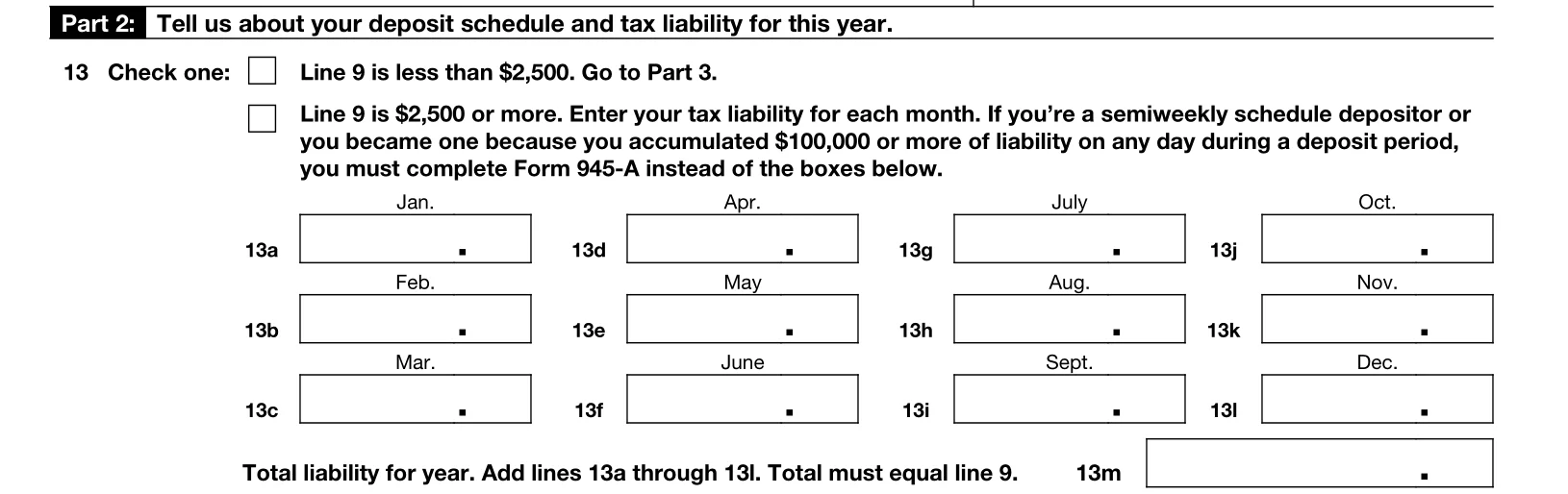
In Part 2 of Form 944, you will enter information about your deposit schedule and tax liability for the year.
-
Line 13
If line 9 is less than $2,500, check the box and go to part 3. If it is more, enter the tax liability for each month.
Suppose line 9 is $2,500 or more, and you are a semiweekly schedule depositor or have accumulated $100,000 or more in liability on any day during a deposit period. In that case, you must complete Form 945-A and attach it to Form 944.


Part 5 - Signature
Part 5 is used to sign confirming that the information provided in the return is true and correct. All of the paid preparer information, such as name, signature & address, should be entered.

Your Signature Process Is Made Simple With TaxBandits!
With TaxBandits, you can use your IRS-assigned Online Signature PIN, or, alternatively, e-sign your return using
Form 8453-EMP.
Related Topics
IRS Form 941
- Form 941
- Form 941 Instructions
- Form 941 Due Dates
- Form 941 Mailing Address
- Form 941 Schedule B
- Form 941 Penalty
- Form 941 ERC
- Form 940 vs 941
- Form 941 vs 944
Revised Form 941 for 2023
Form 941 Worksheets
- Form 941 Worksheet 4 for Q3 & Q4 2021
- Form 941 Worksheet 2 for Q2 2021
- Form 941 Worksheet 1
- Form 941 Worksheets
IRS Form 941-X
Revised Form 941 for 2022
Revised Form 941 for 2021
- IRS Form 941 for Q4 2021
- Revised Form 941 for 2nd Quarter, 2021
- Form 941 Quarter 2 vs Quarter 1, 2021
- Revised Form 941 Schedule R for Q2 2021
- Revised Form 941 for 1st Quarter, 2021
Revised Form 941 for 2020
- Revised Form 941 for 2nd Quarter
- Revised Form 941 for 3rd & 4th Quarters
- Revised Form 941 Schedule R
- Revised Form 941-X

