
 BanditAI
Share this article
IRS Form 940 Instructions
If you are an employer, you are required to complete and file Form 940 annually. Learn how to fill out Form 940 with step-by-step instructions to avoid significant mistakes and penalties.
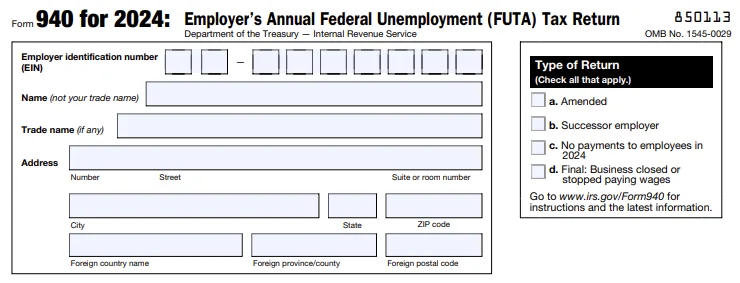
Form 940 consists of two pages, divided into seven parts. Firstly, complete your business information which includes your Employer Identification Number (EIN), name, trade name, and address. Also, choose the type of return which applies to your business.
Type of Return
At the top of your Form 940, check the box to indicate which type of return you’re filing.
- a. Amended: If you are filing this to correct a return that you previously filed, check ‘box a.’
- b. Successor employer: If you are a successor employer, check ‘box b’.
- c. No payments to employees in 2025: If you're not liable for FUTA tax because you haven’t paid your employees during the 2025 tax year, check ‘box c.’
- d. Final: Business closed or stopped paying wages: If this is a final return because your business is closed or stopped paying wages and you won't be filing Form 940 in the future, check ‘box d.’
Aggregate Return Filers Only
This section applies only if you’re filing an aggregate Form 940. An aggregate Form 940 combines FUTA tax information for multiple employers or clients into a single return.
If you’re filing on behalf of more than one employer, you must identify your filer type by checking the appropriate box.
Section 3504 Agent
Check this box if:
- You are a Section 3504 agent, and
- You’re filing an aggregate Form 940 on behalf of home care service recipients.
Requirements:
- You must attach Schedule R (Form 940) to allocate FUTA tax amounts to each client.
- This identifies you as a legally authorized agent under IRS Section 3504.
Use this option only if you are formally designated as a Section 3504 agent.
Certified Professional Employer Organization (CPEO)
Check this box if:
- You are a Certified Professional Employer Organization (CPEO), and
- You’re filing an aggregate Form 940 for your customers.
Requirements:
- You must attach Schedule R (Form 940) showing how FUTA tax amounts are distributed among client employers.
- Your CPEO certification must be active with the IRS.
This option applies only to IRS-certified PEOs.
Other Third Party
Check this box if:
- You’re filing an aggregate Form 940, but
- You are not a Section 3504 agent and
- You are not a CPEO.
Examples include:
- A non-certified PEO
- Any other third party filing an aggregate Form 940 for multiple employers without Section 3504 or CPEO status
This option ensures the IRS correctly identifies the type of third-party filer.
Part 1 - State Unemployment Tax Information

In Part 1 of Form 940, you are required to enter information about your return. If there is a line that does not apply to your business, leave it blank.
- Line 1a - Enter the state abbreviation on line 1a if your business pays unemployment tax.
- Line 1b - Check the box if you are a multi-state employer who paid unemployment taxes in more than one state. You are required to complete and attach 940 Schedule A.
- Line 2 - Check the box if you paid wages in a state that is considered a credit reduction state. The credit reduction states for the 2025 tax year are California and the US Virgin Islands. Check out our article to learn about credit reduction states for prior tax years.
Part 2 - Determine Your FUTA Tax Before Adjustments
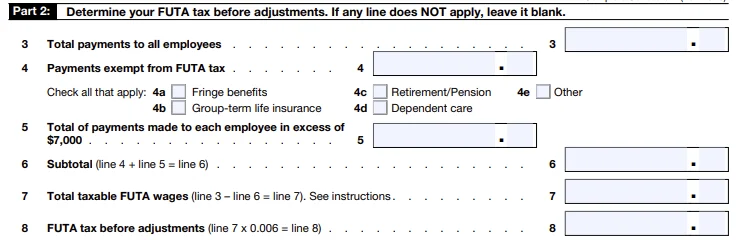
In Part 2 of Form 940, you will be determining your FUTA tax before adjustments. If any lines don't apply to your business, skip them.
- Line 3 - Enter the total payments to all of your employees, even if not all of the payments aren’t subject to FUTA taxes.
-
Line 4 - Enter any payments that are exempt from FUTA taxes. For example, the payment doesn’t fit the definition of wages. Check each of these that apply:
- (4a) Fringe benefits
- (4b) Group-term life insurance
- (4c) Retirement/Pension
- (4d) Dependent care
- (4e) Other
- Line 5 - Enter any payments made to an employee over $7,000 (excess wages). The FUTA wage base is $7,000, this means that any amount beyond the wage base is not subject to FUTA taxes. Subtract any payments that were exempt from FUTA taxes from this amount.
- Line 6 - Enter the subtotal. Add the amounts on Lines 4 and 5 and enter the total on Line 6.
- Line 7 - Enter the total taxable FUTA wages. To get this amount, subtract Line 6 from Line 3 and enter the result on this line.
- Line 8 - Enter the FUTA tax before adjustments. To get this amount, multiply Line 7 by 0.006.
Part 3 - Determine Your Adjustments

In Part 3, you will be determining your adjustments. Only complete the lines that apply to your business.
- Line 9 - If you have excluded all taxable FUTA wages from state unemployment taxes, multiply line 7 by 0.054. Then, proceed to Part 4 (line 12).
- Line 10 - Complete line 10 if some of the taxable FUTA wages you have paid were excluded from state unemployment taxes or if you paid any of your state unemployment taxes late. If any one of these applies to your business, you are required to complete the worksheet. Enter the amount from line 7 of the worksheet.
- Line 11 - If credit reduction applies, complete Line 11 as well. Enter the total from Form 940 Schedule A here.
Part 4 - FUTA Tax and Balance Due or Overpayment
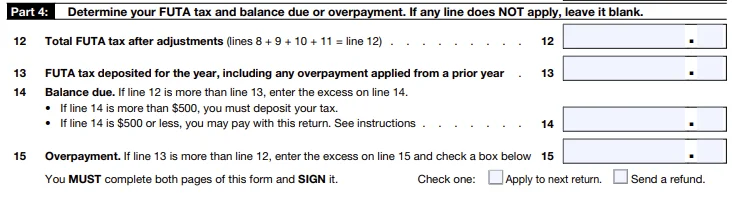
In Part 4, you will be determining your FUTA tax balance due or if you overpaid.
- Line 12 - Enter the sum of lines 8, 9, 10, and 11. Please note that if the amount on Line 9 is greater than zero, Lines 10 and 11 must be zero.
- Line 13 - Enter your FUTA deposits for the year on Line 13. Include any overpayments applied from the previous year.
- Line 14 - You will calculate the balance due. If the amount on Line 13 is smaller than the amount on Line 12, enter the difference on Line 14.
-
Line 15a - Overpayment Amount
Use line 15a to report an overpayment of FUTA tax.
- If the amount on line 13 (total deposits) is more than the amount on line 12 (total FUTA tax due), subtract line 12 from line 13.
- Enter the difference on line 15a.
- This amount represents the extra tax you paid for the year.
-
Line 15b - What to Do With the Overpayment
Use line 15b to tell the IRS how you want your overpayment handled.
You must choose only one option:
- Apply to next return – The overpayment will be credited toward your next Form 940 filing, or
- Refund – The IRS will send the overpayment back to you (direct deposit details required on lines 15c–15e).
Important notes:
- If you don’t check either box—or if you check both—the IRS will generally apply the overpayment to your
next return. - The IRS may still apply your overpayment to any past-due tax balance under your EIN.
- If the overpayment is less than $1, it will only be refunded or applied if you request it in writing.
-
Line 15c - Routing Number
Enter your bank’s 9-digit routing number.
- The first two digits must be 01–12 or 21–32.
- Confirm with your financial institution that it accepts direct deposit refunds.
-
Contact your bank if:
- The routing number on your deposit slip differs from the one on your checks.
- You’re depositing into a savings account without checks, or
- Your checks are payable through a different bank.
-
Line 15d - Account Type
Select the type of account for the refund:
- Checking, or
- Savings
Choose only one option. Selecting the wrong account type may cause the deposit to be rejected.
-
Line 15e - Account Number
Enter your bank account number for the direct deposit.
- Up to 17 characters (numbers and letters).
- Include hyphens, but do not include spaces or special symbols.
- Enter the number from left to right, leaving unused boxes blank.
Part 5 - FUTA Tax Liability by Quarter
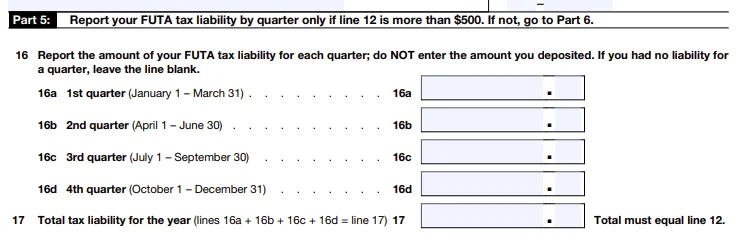
You only need to complete Part 5 of Form 940 if the amount you entered on Line 12 is more than $500; otherwise, skip this part and move to Part 6.
-
Line 16 - Enter your FUTA tax liability (not deposits) for each quarter
- 16a (Quarter 1) - January 1 to March 31
- 16b (Quarter 2) - April 1 to June 30
- 16c (Quarter 3) - July 1 to September 30
- 16d (Quarter 4) - October 1 to December 31
- Line 17 - Enter the total FUTA tax liability for the year by adding up the amount from each quarter.
With these Form 940 instructions, you can easily file Form 940.
Part 6 and 7 - Third-party Designee and Signing Information
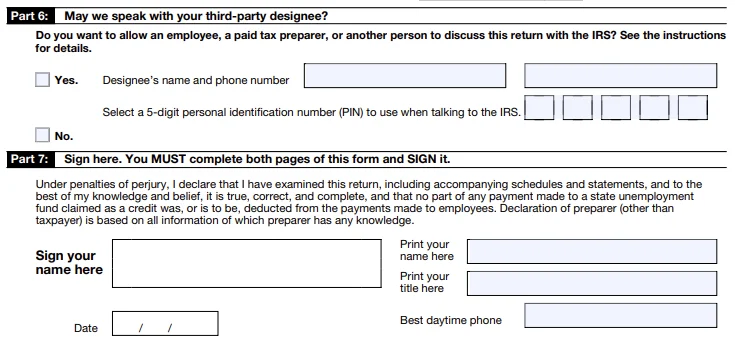
After you've completed the sections above, you are required to sign Form 940. For more information about who is authorized to sign the return, click here.
Paid Preparer Use Only
A paid preparer is someone who is responsible for your Form 940 filing and preparing payroll tax forms on your behalf. If your form is prepared by the paid preparer, enter their information, such as name, signature, address, PTIN, and
contact number.

Signature Process Made Simple with TaxBandits!
With TaxBandits, you can use your IRS-assigned Online Signature PIN, or alternatively, you can use
Form 8453-EMP to e-sign your return.