 BanditAI
IRS Form 945 Instructions
To fill out Form 945, ensure you have all the necessary information related to nonpayroll payments ready. Then, carefully complete each line of Form 945 and submit it by the required deadline. Follow the provided instructions to ensure accurate
945 filings.
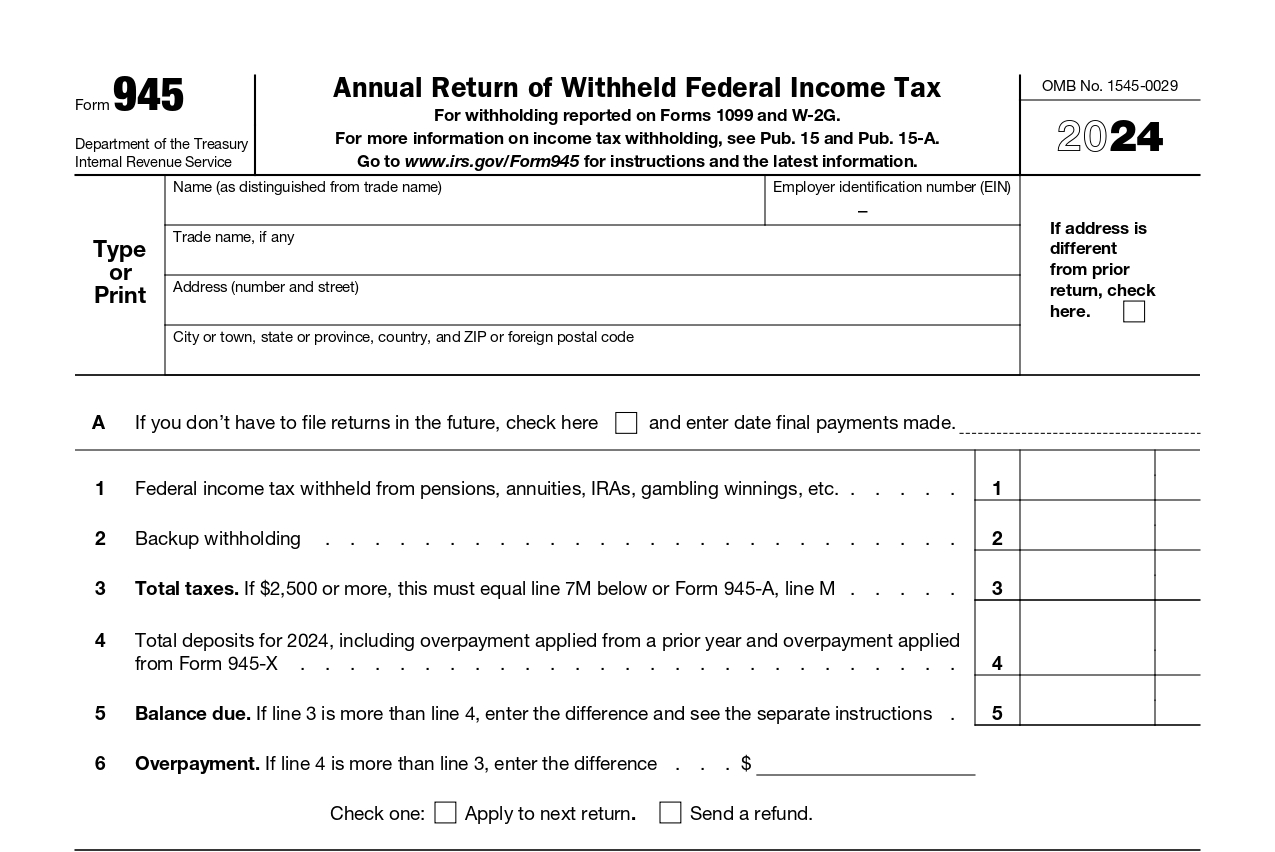
Firstly, you should enter your basic business information, including your business name, address, trade name (if applicable), and EIN (Employer Identification Number).
-
Line A
Check the box if your business isn’t required to file Form 945 in the future, and enter the date on which the final nonpayroll payments were made.
-
Line 1
Enter the total amount of federal income tax that you have withheld from pensions, annuities, IRA distributions, military retirement, and gambling winnings during the calendar year.
-
Line 2
Enter backup withholding that you withheld, including backup withholding on gambling winnings.
-
Line 3
Enter the total taxes by adding lines 1 and 2. If the amount is $2500 or more, the amount entered must match the amount entered on line 7M (Monthly Summary of Federal Tax Liability).
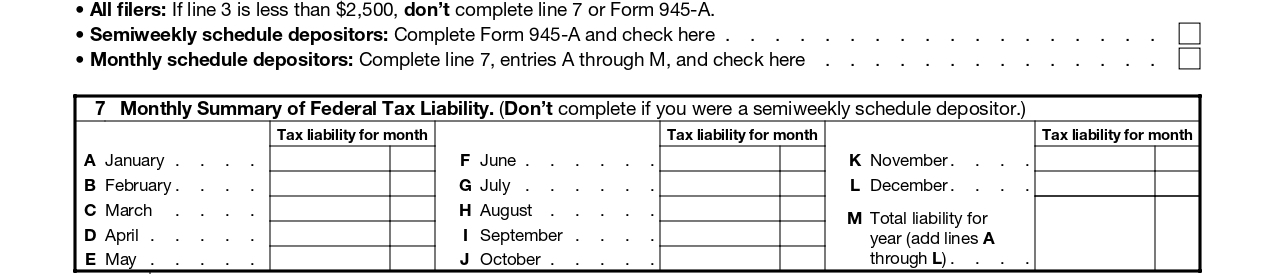
If you are a semiweekly depositor, check the box below (Semiweekly Schedule depositor) and complete Form 945-A. The amount on Line 3 should match the amount on Line M.
-
Line 4
Enter the total deposits made for the tax year, including any overpayments applied from the prior year and
Form 945-X. -
Line 5
Enter the balance due amount, if line 3 is more than line 4 you must enter the difference here.
-
Line 6a - Overpayment Amount
Use line 6a to report an overpayment for the year.
- If the amount on line 4 is more than the amount on line 3, subtract line 3 from line 4.
- Enter the difference on line 6a.
- This amount represents the extra tax you paid.

Do not enter amounts on both line 5 and line 6a.. Complete only the line that applies to your situation.
-
Line 6b - How You Want the Overpayment Handled
Use line 6b to tell the IRS what to do with your overpayment.
- Apply to next return – The overpayment will be credited toward your next tax return, or
- Refund – The IRS will send the overpayment back to you.
Direct Deposit (Optional)
Choosing direct deposit allows you to receive your refund faster and more securely than a paper check.
To receive your refund by direct deposit, you must complete lines 6c–6e.
-
Line 6c - Routing Number
Enter your bank’s 9-digit routing number.
- The first two digits must be 01–12 or 21–32.
- Confirm that your financial institution accepts direct deposits.
-
Contact your bank if:
- The routing number on your deposit slip is different from the one on your checks.
- You’re depositing into a savings account that doesn’t allow checks, or
- Your checks are payable through a different bank than where your account is held.
-
Line 6d - Type of Account
Select the type of bank account for the refund:
- Checking, or
- Savings
Choose only one option. Selecting the wrong account type may cause the deposit to be rejected.
-
Line 6e - Account Number
Enter your bank account number for the direct deposit.
- Up to 17 characters (numbers and letters).
- Include hyphens, but do not include spaces or special symbols.
- Enter the number from left to right, leaving unused boxes blank.
-
Line 7
Enter your federal tax liability which depends on the amount entered on line 3.
- If line 3 is less than $2,500, you aren’t required to complete line 7 or Form 945-A.
- If line 3 is more than $2,500 and you are a monthly depositor, enter the monthly summary of your federal tax liability on line 7.
-
If you are a semiweekly depositor, skip line 7. Instead, you are required to attach Form 945-A along with
Form 945.
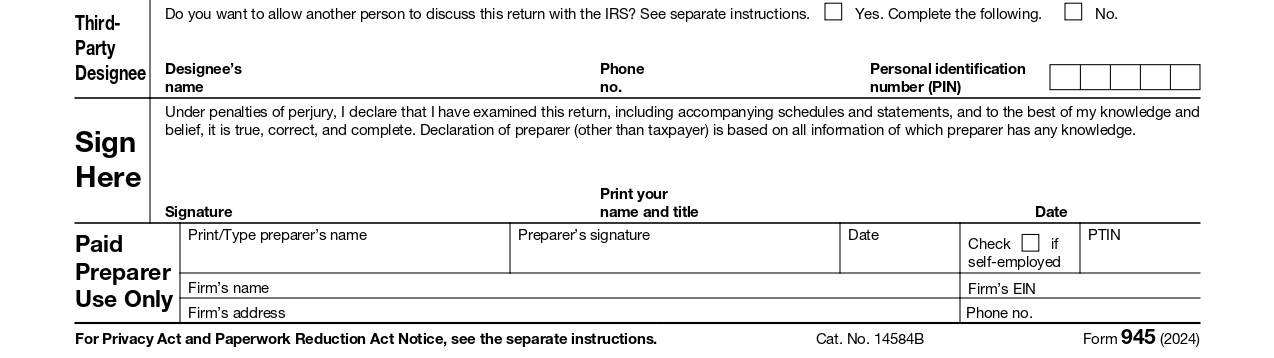
Third-party designee: If you allow an employee, paid preparer, or another person to discuss about Form 945, check the box “Yes” in this section and enter the designee’s name, phone number, and Preparer Tax Identification Number (PTIN).
Sign and Date: Ensure your Form 945 is signed and dated in the designated area by an authorized individual, such as the owner, officer, or authorized agent of the entity. Include the signer's title, phone number, and address in the appropriate fields.
If you have authorized a paid preparer to file Form 945, they must also sign and date it, providing their Preparer Tax Identification Number (PTIN) and their firm's name, address, and phone number.

One-Click Signing Process Made Just for You!
TaxBandits lets you e-sign your return using either your IRS-assigned 94x Online Signature PIN or the built-in Form 8453-EMP for a seamless process.