 BanditAI
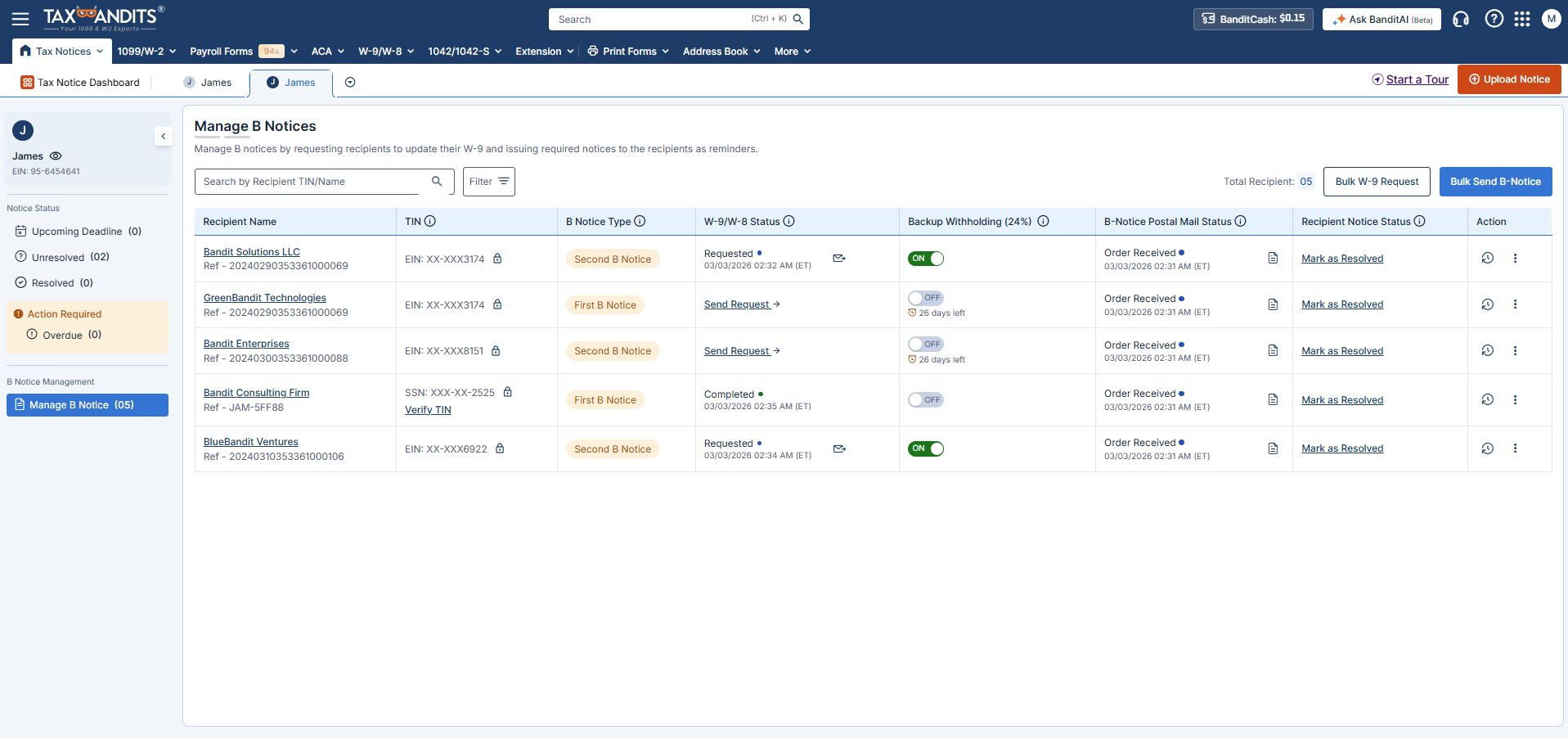
Understanding CP2100/CP2100A Notice
-
What is a CP2100/CP2100A Notice?
The IRS sends this notice when the payee name and TIN reported on your information returns (such as Form 1099) do not match IRS records.
-
When businesses typically get it
This notice is typically sent 3 to 4 months after filing forms like 1099 when TIN mismatches are detected by the IRS.
-
What is the deadline to respond to the notice?
You generally have 15 business days from the date of the notice to send the appropriate B-Notices to the payees. If a payee does not provide the corrected information, you must begin backup withholding within 30 business days.
-
Why is a timely response critical?
Ignoring the notice can lead to penalties, backup withholding, and further
IRS issues.
How to resolve the CP2100/CP2100A Notice?
Follow these simple steps to resolve your notice.
Review the Notice
Open your notice and identify which recipients (payees) have TIN mismatches. The IRS will list each affected person or business.
What to look for:
- Recipient names that don't match IRS records.
- Incorrect or missing tax ID numbers.
- The specific forms that triggered the notice.
Send B-Notices to Recipients
A "B-Notice" is simply a letter informing recipients that their tax information doesn't match IRS records. You need to request an updated Form W-9 from each affected person.
Timeline:
- First B-Notice: Send within 15 business days of receiving the IRS notice.
- Wait period: Give recipients 30 days to respond.
- Second B-Notice: If you receive a second CP2100 or CP2100A Notice for the same payee within three calendar years, you must send a Second B-Notice.
TaxBandits automates this: We handle the entire mailing process for you—no printing, stuffing envelopes, or trips to the post office. A fee of $4.99 is charged for mailing B Notices to recipients.
Correct the Errors & Update Your Records
Once recipients send you corrected W-9 forms:
- Update the TIN information in your system.
- File corrected 1099 forms with the IRS.
- Verify the new TINs match IRS records (TaxBandits does this automatically).
TaxBandits streamlines the entire process—from W-9 collection to TIN matching and 1099 corrections, ensuring smooth compliance every step of the way.
Start Backup Withholding (If Needed)
If a recipient doesn't provide corrected information after the Second B-Notice, you're required to begin backup withholding.
What is backup withholding?
You withhold 24% of certain payments to the recipient and send that money to the IRS. This ensures they pay taxes even if their information is incorrect.
- When to start: Begin withholding on the first payment made 30 days after sending the Second B-Notice.
- When to stop: Stop withholding within 30 days of receiving correct TIN information from the recipient.
TaxBandits handles Form 945: If you need to report backup withholding, we'll help you file Form 945 to send those withheld funds to the IRS.
Review the Notice
Open your notice and identify which recipients (payees) have TIN mismatches. The IRS will list each affected person or business.
What to look for:
- Recipient names that don't match IRS records.
- Incorrect or missing tax ID numbers.
- The specific forms that triggered the notice.
Send B-Notices to Recipients
A "B-Notice" is simply a letter informing recipients that their tax information doesn't match IRS records. You need to request an updated Form W-9 from each affected person.
Timeline:
- First B-Notice: Send within 15 business days of receiving the IRS notice.
- Wait period: Give recipients 30 days to respond.
- Second B-Notice: If you receive a second CP2100 or CP2100A Notice for the same payee within three calendar years, you must send a Second B-Notice.
TaxBandits automates this: We handle the entire mailing process for you—no printing, stuffing envelopes, or trips to the post office. A fee of $4.99 is charged for mailing B Notices to recipients.
Correct the Errors & Update Your Records
Once recipients send you corrected W-9 forms:
- Update the TIN information in your system.
- File corrected 1099 forms with the IRS.
- Verify the new TINs match IRS records (TaxBandits does this automatically).
TaxBandits streamlines the entire process—from W-9 collection to TIN matching and 1099 corrections, ensuring smooth compliance every step of the way.
Start Backup Withholding (If Needed)
If a recipient doesn't provide corrected information after the Second B-Notice, you're required to begin backup withholding.
What is backup withholding?
You withhold 24% of certain payments to the recipient and send that money to the IRS. This ensures they pay taxes even if their information is incorrect.
- When to start: Begin withholding on the first payment made 30 days after sending the Second B-Notice.
- When to stop: Stop withholding within 30 days of receiving correct TIN information from the recipient.
TaxBandits handles Form 945: If you need to report backup withholding, we'll help you file Form 945 to send those withheld funds to the IRS.
Resolve CP2100/CP2100A Notices with Confidence—TaxBandits Has You Covered.
Simply upload the notice you received, and TaxBandits simplifies the entire process—from TIN corrections to sending B-Notices and managing backup withholding.

Mailing B-Notices to Recipients
TaxBandits automates mailing B-Notices to recipients, reducing paperwork and ensuring compliance without the hassle of manual mailing.

Secure W-9 Requests
Request, collect, and manage W-9 forms electronically to correct TIN mismatches quickly and securely.

Automated TIN Matching
Once a corrected W-9 is submitted, automatically validate the payee’s name and TIN against IRS records to prevent repeat notices. A standard charge of $0.35/verification will apply.

1099 & 945 Filing Support
TaxBandits helps you file 1099 corrections if needed. Plus, if backup withholding comes into play, we simplify the filing of Form 945.
How TaxBandits Helps You Resolve IRS CP2100/CP2100A Notices?
Create your free account and follow these simple steps to manage IRS notices with ease and confidence!
-
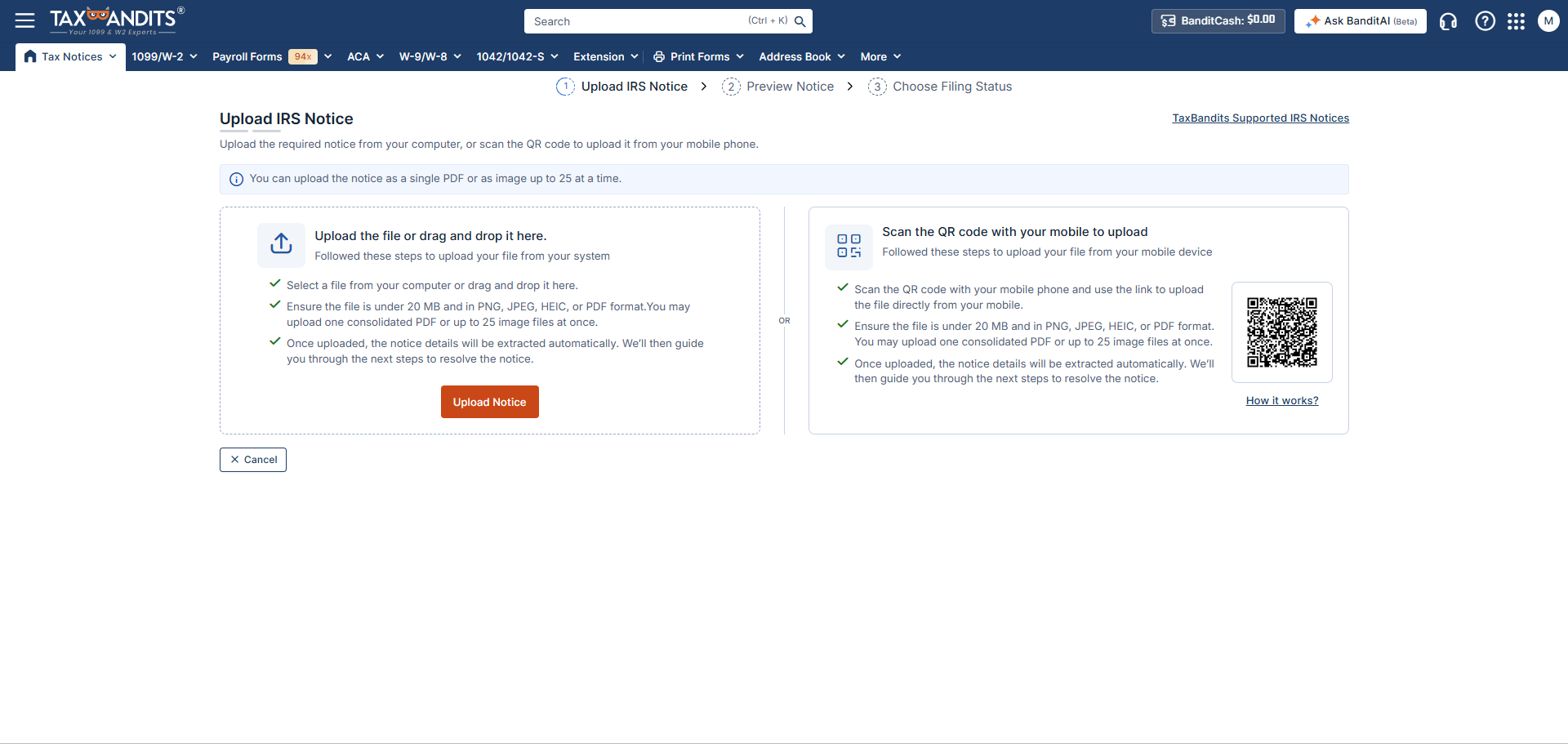
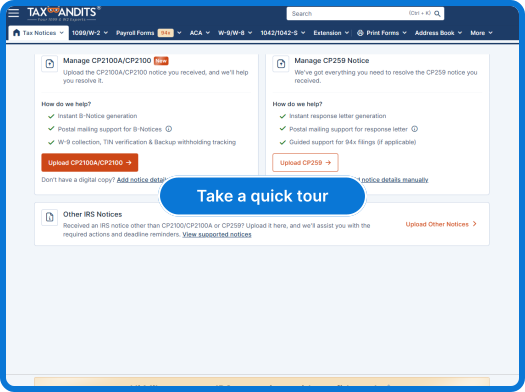
Step 1: Upload IRS CP2100/CP2100A Notice
Simply scan and upload a copy of the IRS CP2100/CP2100A notice you received, and let our system extract the details automatically.
-
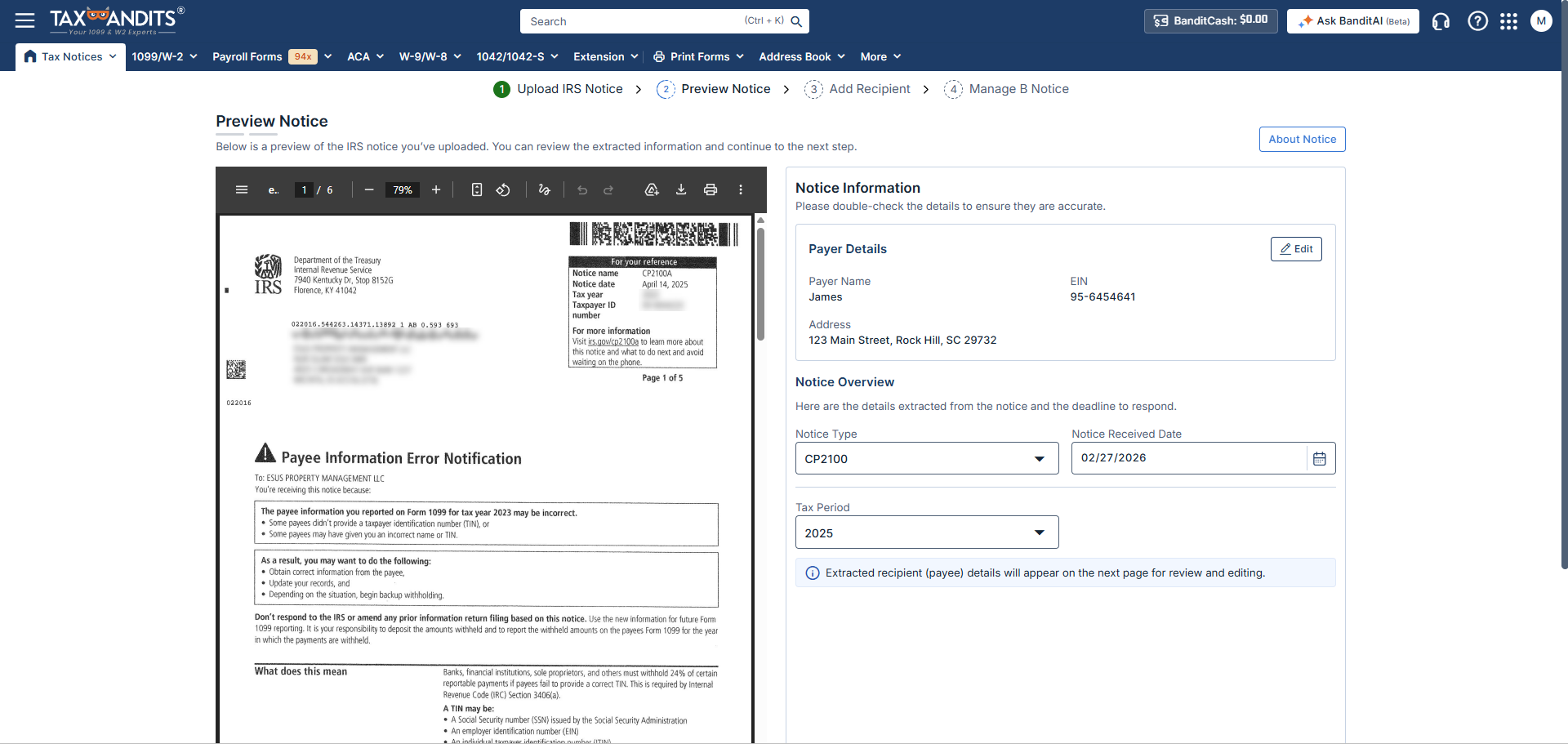
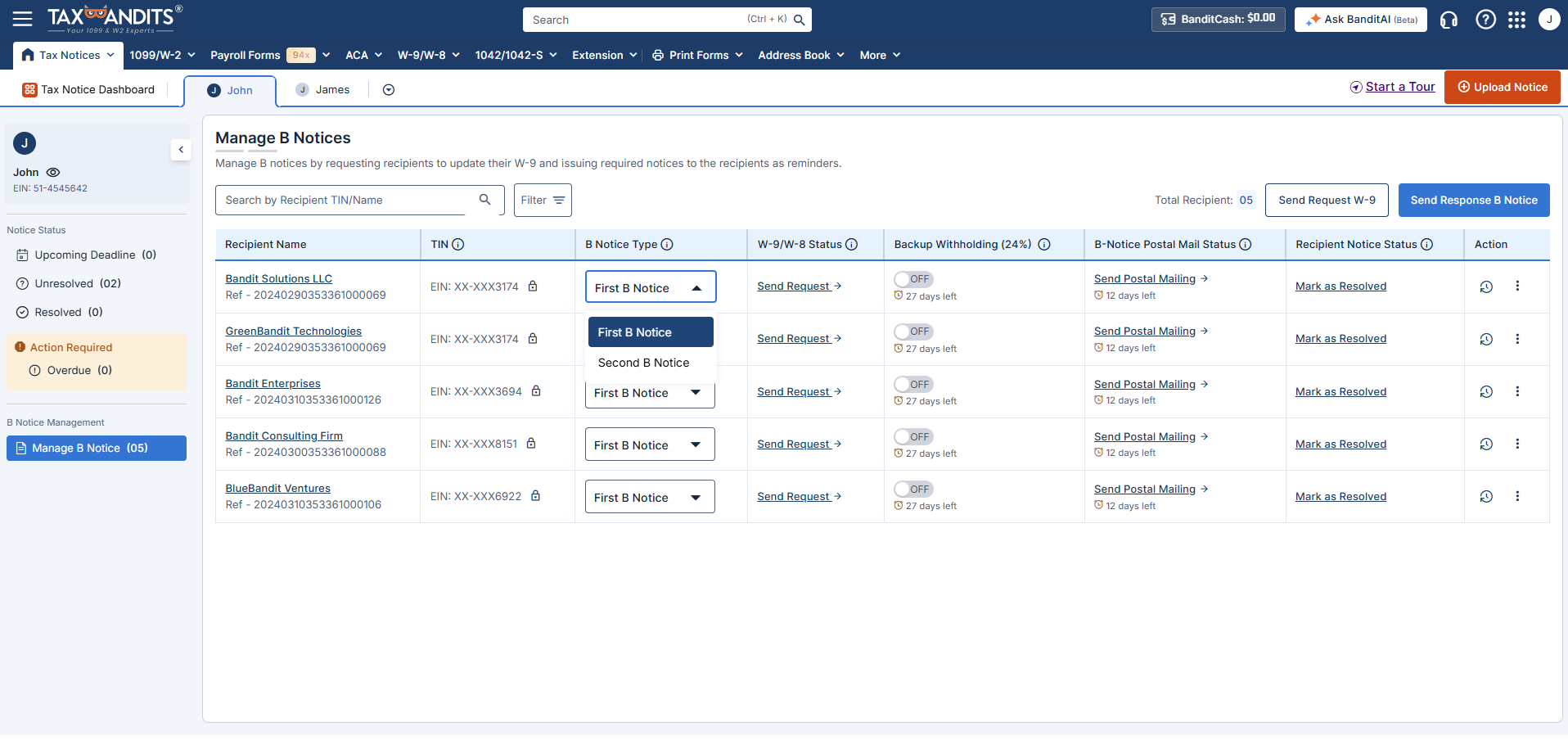
Step 2: Review Mismatched Information
Review the list of recipients with TIN mismatches. Assign the appropriate First or Second B Notice, and initiate W-9 requests to collect corrected information.
-
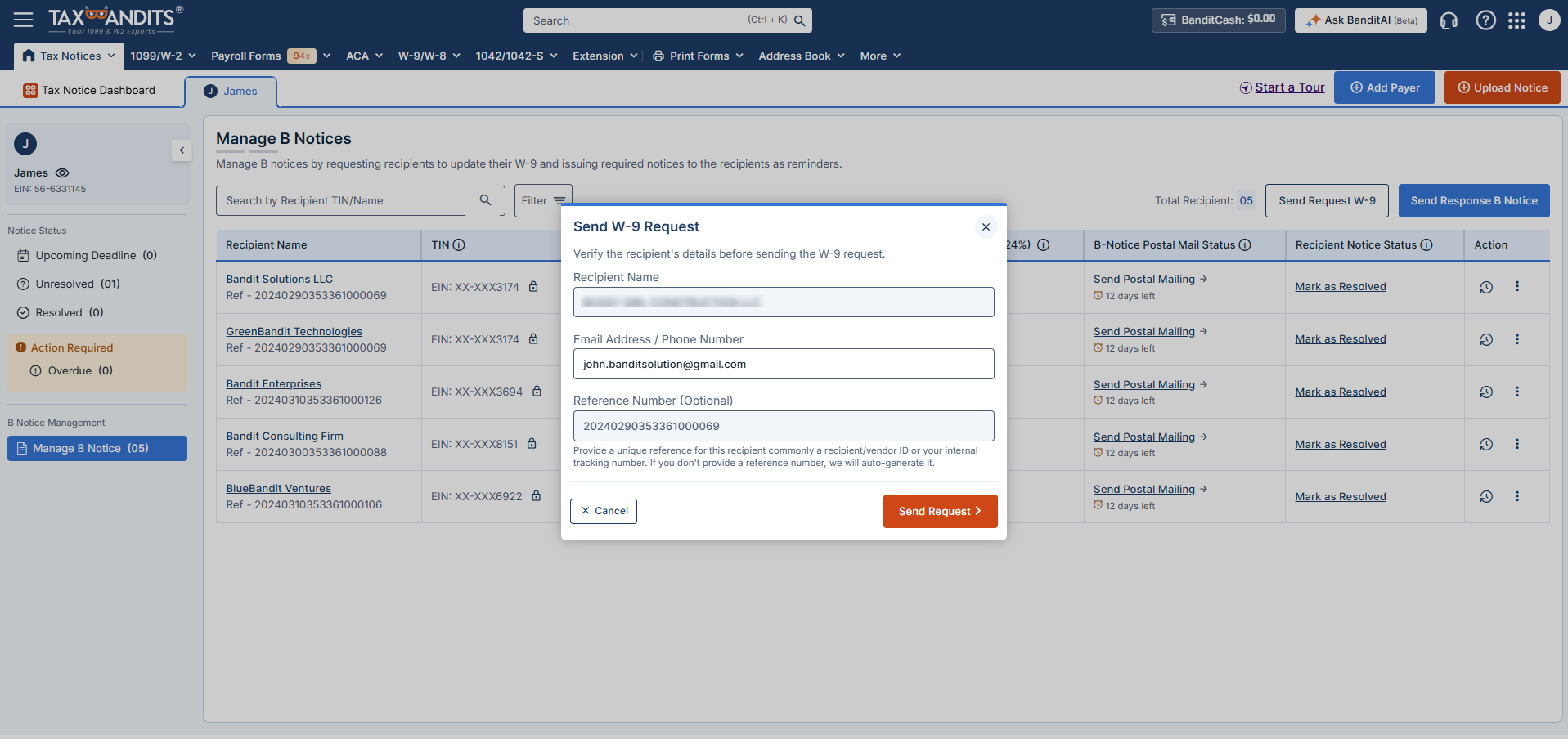
Step 3: Send B Notices & Track Responses
Let TaxBandits generate and send B Notices to affected recipients. Track delivery status and monitor W-9 responses to stay compliant and resolve the notice efficiently.
-
Step 1: Upload IRS CP2100/CP2100A Notice
Simply scan and upload a copy of the IRS CP2100/CP2100A notice you received, and let our system extract the details automatically.
-
Step 2: Review Mismatched Information
Review the list of recipients with TIN mismatches. Assign the appropriate First or Second B Notice, and initiate W-9 requests to collect corrected information.
-
Step 3: Send B Notices & Track Responses
Let TaxBandits generate and send B Notices to affected recipients. Track delivery status and monitor W-9 responses to stay compliant and resolve the notice efficiently.
Ready to manage CP2100/CP2100A notices with TaxBandits?
How to Resolve IRS CP2100/CP2100A Notices
Pay only when you mail B Notices to recipients
No hidden fees, no surprise costs.
What’s Included
- Mailing of B Notices to recipients (First & Second)
- Real-time status tracking
$4.99/Notice
Frequently Asked Questions
When do businesses receive CP2100/CP2100A Notices?
The IRS sends CP2100 and CP2100A notices after reviewing your filed information returns that have an error for the previous tax year.
- CP2100 - You will receive this notice if you filed 50 or more information returns with errors.
- CP2100A - You will receive this notice if you filed fewer than 50 information returns with errors.
What is a B-Notice, and why do I need to send it?
A B-Notice is sent to recipients whose TINs are mismatched with IRS records. It informs them of the issue and requests updated information. TaxBandits handles the entire process of mailing B-Notices to recipients on your behalf, saving you time and ensuring full compliance with IRS requirements.
What happens if a recipient doesn’t respond to the B-Notice?
- If there is no response to the First B-Notice within 30 days, TaxBandits will automatically prompt you to send the Second B-Notice and begin backup withholding on future payments.
- Backup withholding continues until the correct information is provided.
What is backup withholding?
Backup withholding is the IRS requirement to withhold a percentage of certain payments (currently 24%) when the recipient’s TIN is incorrect, missing, or if they have underreported their income in the past. The withheld amounts are sent to the IRS to ensure the recipient fulfills their tax obligations.
What type of payments are subject to backup withholding?
Backup withholding may apply to the following reportable payments when a valid TIN is not provided or is incorrect:
- Nonemployee compensation (Form 1099-NEC)
- Rents, royalties, commissions, attorney payments, and other miscellaneous income (Form 1099-MISC)
- Interest income (Form 1099-INT)
- Dividends (Form 1099-DIV)
- Patronage dividends (Form 1099-PATR)
- Original issue discount paid in cash (Form 1099-OID)
- Broker and barter exchange proceeds (Form 1099-B)
- Certain gambling winnings (Form W-2G), if not subject to regular gambling withholding
- Payment card and third-party network transactions (Form 1099-K)
- Certain taxable government payments, including grants and agricultural payments (Form 1099-G)
What is Form 945, and when do I need to file it?
Form 945 is used to report and pay backup withholding to the IRS. If backup withholding is required due to TIN mismatches, TaxBandits helps you file Form 945 to ensure full compliance with IRS regulations.